

How to Associate Quotation in Billing App/CRM As A Service

Updated: Sep 7
In a fast-moving sales cycle, speed and accuracy are everything. Your team wastes valuable time when they have to manually re-type customer data from an opportunity to a price quote. This manual entry isn't just slow—it's a perfect opportunity for errors.
CRM as a Service solves this by associating your Quotations to your Opportunities, Contacts, and Organizations. This integration stops data entry errors and manually entering them.
Start Your Quote, Associate Your Opportunity
The standard process for creating a quote begins on the Quotations page. However, the best way to ensure accuracy is to associate it to an existing Opportunity right from the start. This prevents manual data entry.

Start a New Quote: Navigate to the Quotations section and click to create a new quotation.
Select Opportunity: The system will prompt you to associate to an existing Opportunity.
Auto-Fill Data: By associating the Opportunity, CRM as a Service automatically populates the new quotation's fields, including the Title, Organization, and Contact. This saves you from re-typing key information.
Auto-Fill Your Emails in Quotation by Associating Contacts
A quote is meant for a specific person. When you associate a Contact to your quotation, their information (name, email, phone) is pulled directly into the record.

By associating your contact it does more than just store their name. When you click "Approve & Send by E-mail," the system automatically adds that associated contact's email address to the "To:" field in the email draft.
You don't need to manually put e-mail into this draft. The right quote goes to the right contact, every time.
Managing your Associate: Organization & Opportunity to a Quotation
Because the Organization field is mandatory, CRM as a Service automatically guarantees a 360-degree view of your client. Every quote is instantly added to that Organization's history.
However, we know flexibility is key. Here is how you can manage these association if you need to make changes or connect records later.
Managing the Associated Organization
A quotation must always belong to an Organization. Therefore, you cannot remove an Organization from a Quotation, you can only change it to a different one.


To Change the Organization from the Quotation: Open the draft quote, click the three dots (...) next to the Organization name in the sidebar, and select "Change associated organization". Or you can open the Specific Organization page and select "Associate An Existing Quotation," the system will change that quote from its previous organization to the current one.
Managing the Associated Opportunity
Unlike Organizations, Opportunities are optional connections. You have full flexibility to associate, remove, or change them.
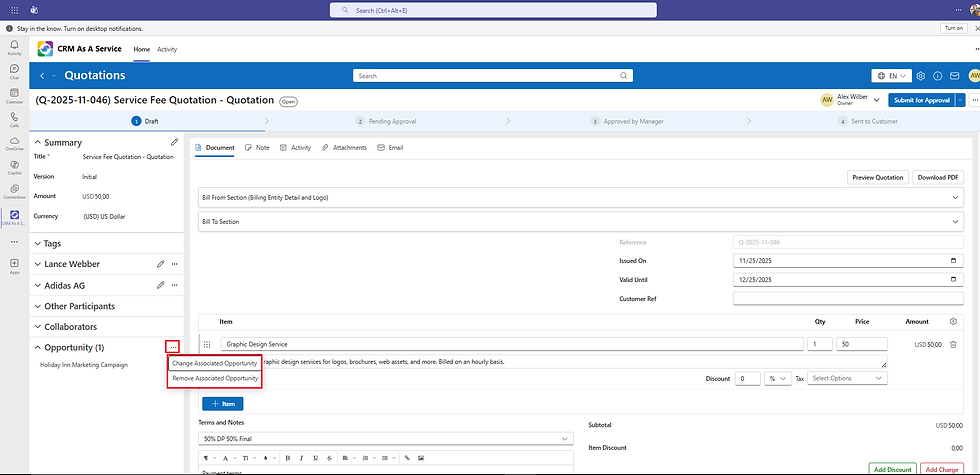
To Remove Associated Opportunity: If a quote was associated to the wrong Opportunity, or if the Opportunity is no longer relevant, you can remove the connection. Open the quotation, locate the Opportunity in the sidebar, click the three dots (...), and select Remove Associated Opportunity.

From the Opportunity Page : If you created a quote but forgot to associate it to the Quotation, you can connect it without opening the quote itself:
Open the specific Opportunity record.
Locate the Quotation section in the left navigation panel.
Click the three dots (...) menu icon next to the Quotation header.
Select Associate An Existing Quotation.
This instantly ties the record together, ensuring your customer history is always complete and accessible from a single view.
TeamsWork is a Microsoft Partner Network member, and their expertise lies in developing Productivity Apps that harness the power of the Microsoft Teams platform and its dynamic ecosystem. Their SaaS products, including CRM As A Service, Ticketing As A Service and Checklist As A Service, are highly acclaimed by users. Users love the user-friendly interface, seamless integration with Microsoft Teams, and affordable pricing plans. They take pride in developing innovative software solutions that enhance company productivity while being affordable for any budget.


Comments