
5 Best Microsoft Teams Helpdesk Solutions for the EU: GDPR Compliance, Security & Multi-Language Support
Marc (TeamsWork) · Feb 10, 2025 · 4 min read · Updated: Oct 8, 2026

Efficient helpdesk solutions are essential for organizations aiming to provide exceptional support services. For businesses operating within the European Union (EU), selecting a helpdesk system that ensures compliance with the General Data Protection Regulation (GDPR) is paramount. This article explores top Microsoft Teams-integrated helpdesk solutions tailored for the EU market, emphasizing their adherence to GDPR standards and data residency requirements.
What is GDPR Compliance and Why It Matters for Microsoft Teams Helpdesk?
The General Data Protection Regulation (GDPR) is a comprehensive data protection law enacted by the EU to safeguard the privacy and personal data of its residents. It mandates that organizations handling EU citizens' data implement stringent measures to ensure data security, transparency, and accountability. For helpdesk solutions, GDPR compliance means processing and storing customer information in a manner that respects these regulations, thereby protecting sensitive data and maintaining customer trust.
Key Considerations When Choosing a Microsoft Teams Helpdesk for the EU Market
When evaluating Microsoft Teams helpdesk for the EU market, consider the following:
- GDPR Compliance: Ensure the helpdesk system adheres to GDPR requirements, including data processing agreements and data subject rights.
- Data Residency: Verify that data storage and processing occur within the EU or in countries with adequate data protection standards.
- Security Measures: Assess the implementation of robust security protocols, such as encryption and access controls, to protect sensitive information.
- Integration Capabilities: Evaluate how seamlessly the helpdesk integrates with Microsoft Teams and other tools used within your organization.
- Multi-Language Supports: Given the linguistic diversity in the EU, opt for a solution that supports multiple languages to enhance accessibility and user experience.
Top Helpdesk Solutions for Microsoft Teams in the EU
Ticketing As A Service
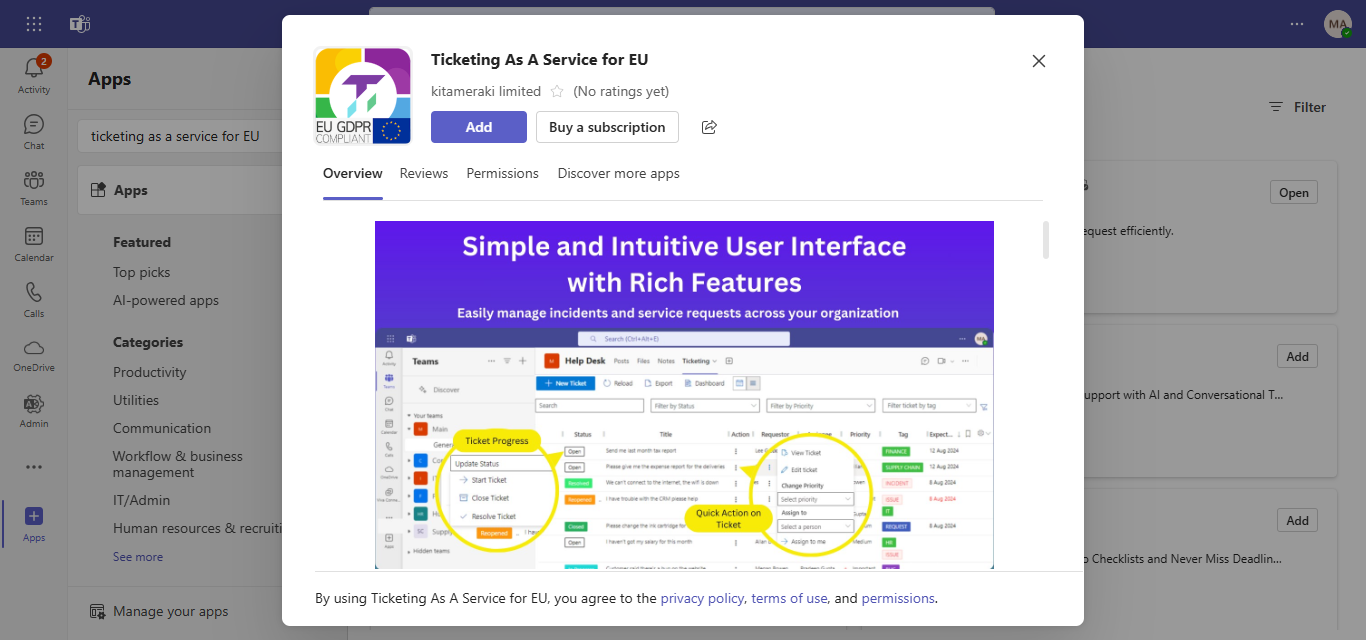
Ticketing As A Service is a ticketing system that is natively integrated with Microsoft Teams. It offers a dedicated EU version with data residency in Germany, a member country of the EU. This localization ensures that your data stays within EU borders, enhancing compliance with GDPR requirements. Moreover, since the server is physically located within the EU, it provides optimized performance, delivering faster response times and reducing latency for users in the region.
The solution also meets rigorous security standards, being Microsoft 365-certified and passing Microsoft's security and compliance tests. This means that businesses can trust Ticketing As A Service to handle their support tickets securely, while ensuring data privacy and operational efficiency. Additionally, Ticketing As A Service supports multiple languages, including German, Spanish, French, Italian, and more, catering to a diverse European user base.
2. Assist by Atlassian (Jira)
Atlassian Assist, formerly known as Halp, is a helpdesk solution that integrates seamlessly with Microsoft Teams. Atlassian is committed to GDPR compliance, offering data residency options that allow customers to pin in-scope product content at rest to specific locations, such as Europe. This ensures that data remains within EU borders, aligning with GDPR requirements.
In terms of security, Atlassian employs data encryption both at rest and in transit, and has plans to build BYOK (Bring Your Own Key) encryption, as highlighted in Atlassian’s cloud roadmap. Regarding multi-language support, Atlassian Assist currently supports English, with additional language support potentially available through Atlassian's broader platform capabilities.
3. Tikit
Tikit, developed by Cireson, is a ticketing system designed for Microsoft Teams. Regarding GDPR compliance, Tikit has completed compliance efforts for the General Data Protection Regulation (GDPR). However, specific information about data residency within the EU is not explicitly provided.
Regarding security, Tikit supports TLS 1.1 or higher, ensuring data is encrypted during transmission. As for language support, Tikit primarily operates in English, with no specific information about support for other languages.
4. Zendesk
Zendesk is a customer service platform that integrates with Microsoft Teams, allowing support agents to manage tickets and communicate with customers efficiently. Zendesk is committed to GDPR compliance and offers data residency options within the EU. The platform supports numerous languages, catering to a global audience. Security features include encryption of data at rest and in transit, advanced authentication options, and regular compliance audits to maintain high security standards.
5. IT-Connect by DeskDay
IT-Connect by DeskDay is a helpdesk ticketing application designed for Managed Service Providers (MSPs), offering seamless integration with Microsoft Teams. However, there is no specific information indicating that IT-Connect by DeskDay offers server locations within EU countries. Additionally, details about multi-language support are not readily available. Organizations operating within the EU should carefully assess these factors to ensure compliance with regional data protection regulations and to meet the linguistic needs of their user base.
Conclusion
When choosing a helpdesk system for Microsoft Teams, businesses must consider factors such as GDPR compliance, data residency, security, and multi-language support. Several options are available, each offering unique advantages.
If you're looking for a helpdesk system that integrates seamlessly with Microsoft Teams, ensures EU data residency for GDPR compliance, and supports multiple languages, Ticketing As A Service for EU is the perfect choice. With its dedicated EU servers, Microsoft 365 certification, and strong security measures, it provides a reliable and efficient solution for businesses operating across Europe.
Explore Ticketing as a Service for EU
Still switching tabs to get things done? TeamsWork brings your business apps into Microsoft Teams — Ticketing, CRM, Checklist, and Billing — so support, sales, and tasks all live where your team already works. Microsoft Solutions Partner certified, trusted by 500+ organizations.