

How to Add Ticketing as a Service to a Microsoft Teams Channel

Updated: Jun 15
Hi All,
In Ticketing as a Service, you can create multiple instances — think of each one as its own helpdesk with dedicated settings, including Assignees list, workflow configuration, ticket form configuration, and more. Instances are primarily created and managed from the Personal App. This article covers how to add one to a Microsoft Teams channel tab.
Adding a Channel Instance from a Channel Tab
Adding a Ticketing instance to a channel tab gives you two advantages. First, it lets you and your team access the instance directly from the channel — useful when the instance is closely related to the channel's work, such as an IT helpdesk in the IT channel. Second, it lets you configure user management through membership mode, so you control who has access without manually managing a separate member list.
Add a new tab in the Teams channel, find and select the Ticketing as a Service.

Choose how to set up your instance: to link an existing personal instance, select it from the list; to create a new instance, enter a name and Key ID. Creating a new instance also creates a personal instance that appears in the personal app.
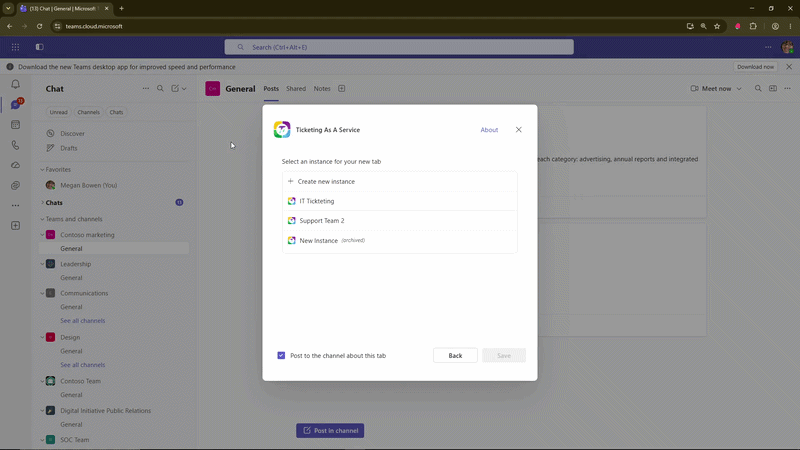
Configure the membership mode: Public (everyone in the channel has access), Private (configure the owner and member list manually), or Full Channel Sync (synced with channel members automatically — Requires app permissions in Settings).

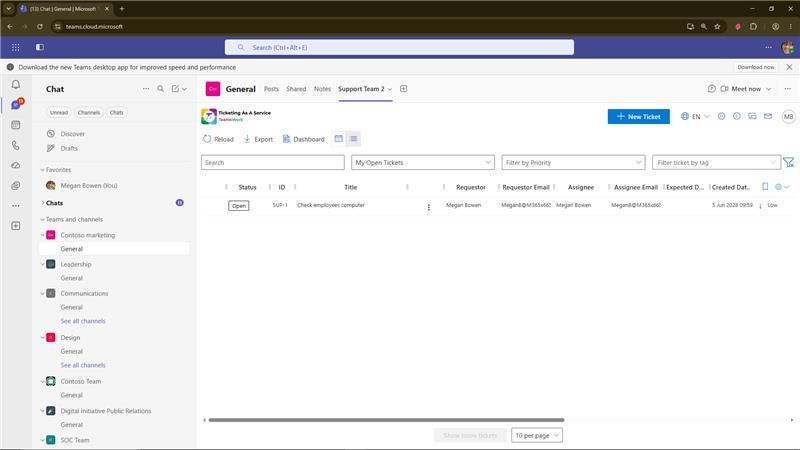
Done. Your instance is now accessible as a tab in the channel.
Hope you find this post helpful for setting up your Ticketing instances the right way.
Have a nice day!
Marc
TeamsWork is a Microsoft Partner Network member, and their expertise lies in developing Productivity Apps that harness the power of the Microsoft Teams platform and its dynamic ecosystem. Their SaaS products, including CRM as a Service, Ticketing as a Service and Checklist as a Service, are highly acclaimed by users. Users love the user-friendly interface, seamless integration with Microsoft Teams, and affordable pricing plans. They take pride in developing innovative software solutions that enhance company productivity while being affordable for any budget.


Comments