
Preview of the new TeamsWork site · not the live website

Managing your Email Sync in CRM as a Service

Marc (TeamsWork) · Sep 18, 2024 · 3 min read · Updated: Oct 7, 2026

Managing your Email Sync in CRM as a Service

Efficient email communication is essential for managing leads and opportunities effectively. With CRM as a Service, a Teams-native CRM, integrated into the Microsoft ecosystem, you can seamlessly synchronize emails between CRM and Outlook, giving you a complete 360-degree view of all customer interactions.

Enabling email synchronization offers several advantages:

  1. Unified Mail Management: View and manage your Outlook mailbox directly within the CRM app, allowing you to handle all your emails from a single platform without switching between applications.
  2. Contextual Email Visibility: Effortlessly access and visualize emails related to specific Contacts, Leads, Opportunities, and Cases, ensuring you have all relevant information at your fingertips and can follow up efficiently.
  3. Sending Email: You can send emails directly to any of your contacts without leaving CRM as a Service.
  4. Email Logging: Automatically track and log all email interactions for each entity—Leads, Opportunities, Organizations, Cases, and Contacts—ensuring a complete communication history for better follow-ups and decision-making.

In this post, we’ll guide you through the process of setting up and using email synchronization, helping you make the most of this integration for streamlined communication and enhanced productivity.

Setting Up Email Synchronization

Visualizing and Managing your Mailbox

Contextual Email Visibility

Send Emails from CRM as a Service

Setting Up Email Synchronization

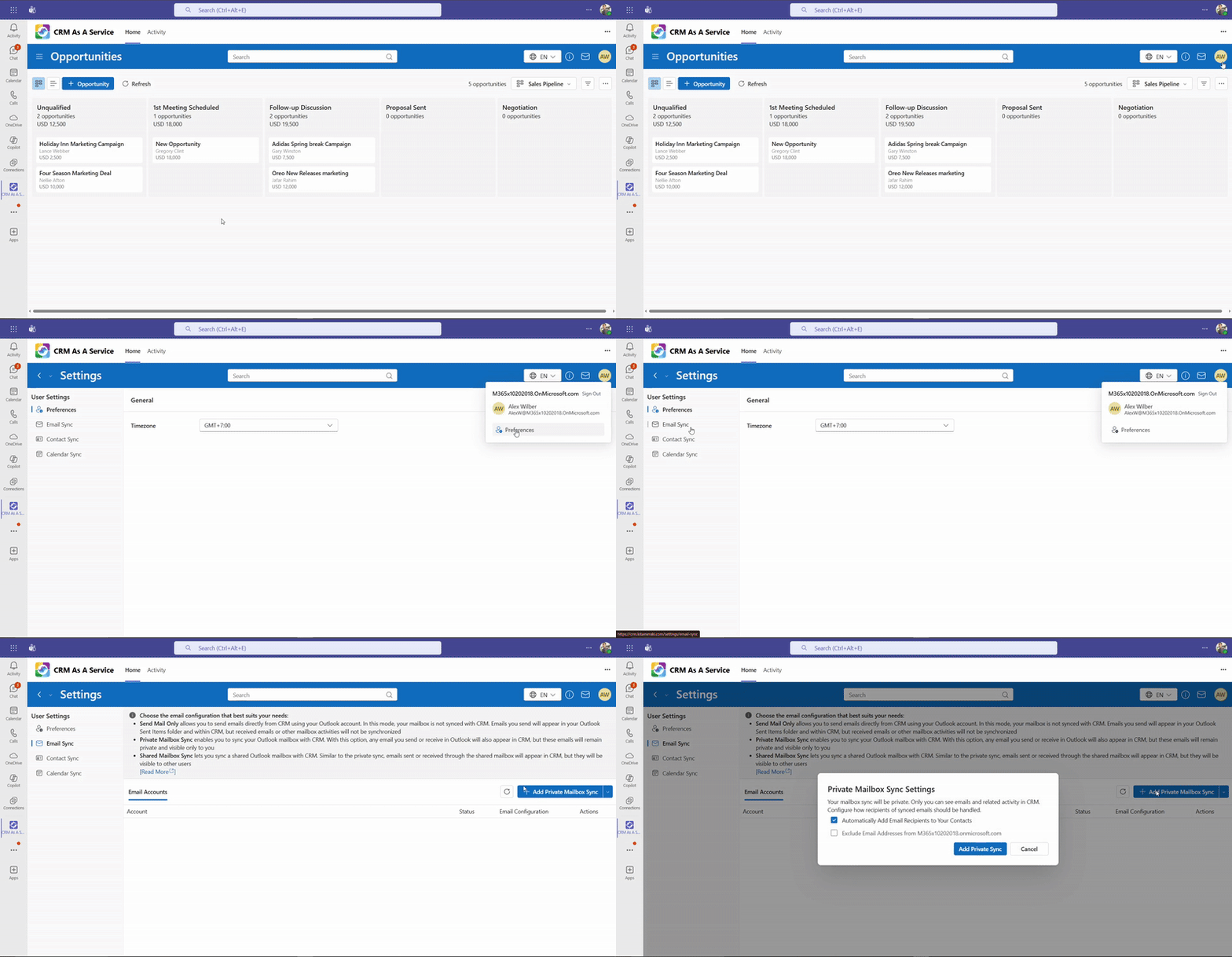
To begin setting up email sync in CRM as a Service, follow these steps:

  1. Open CRM as a Service within Microsoft Teams.
  2. Navigate to your profile card on top right.
  3. Click Preferences.
  4. Go to Email Sync and click add.

Alternatively, if you are a CRM Owner, you can access Email Sync by clicking the Settings button.
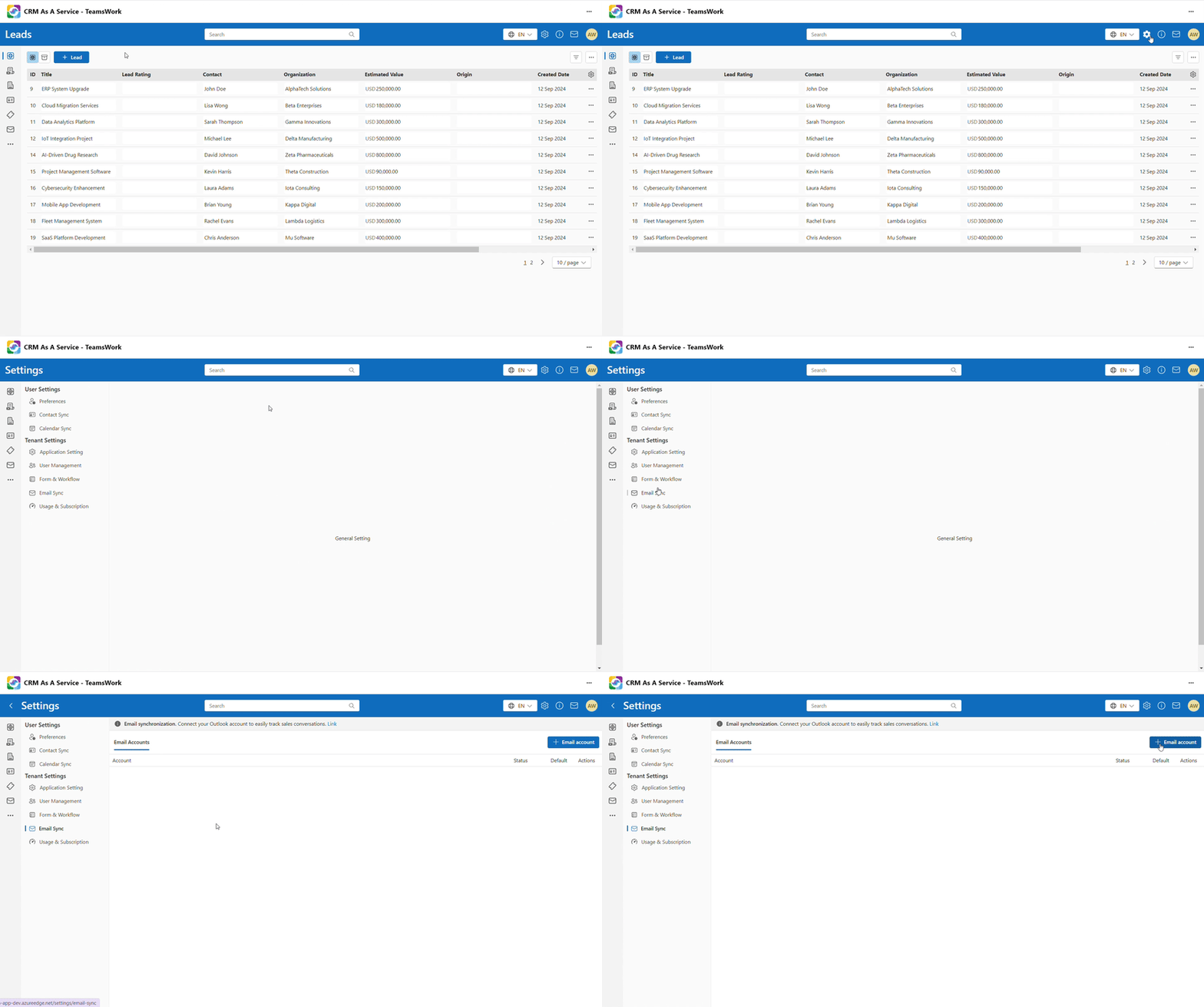
When setting up your mailbox sync, you'll be prompted to choose one of the following options:
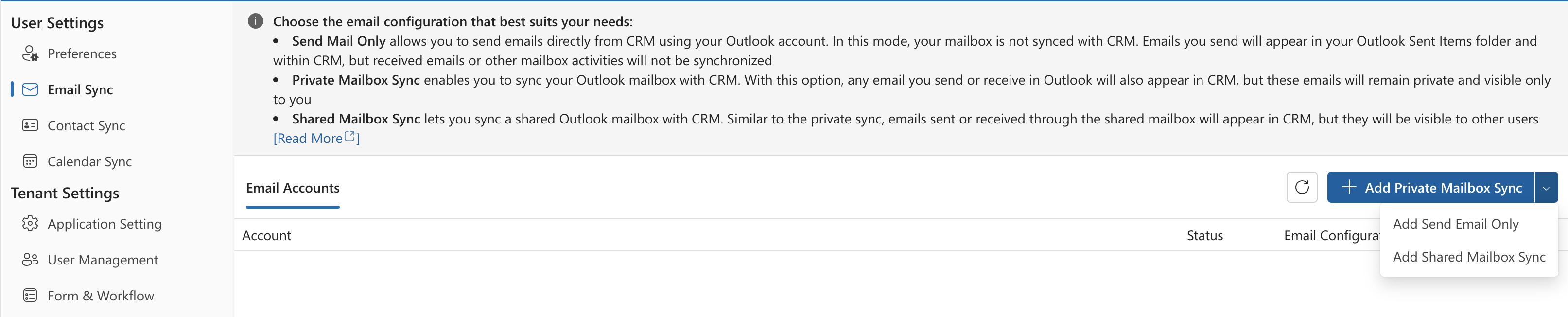
Mailbox sync configuration page
  • Private Mailbox Sync

    Emails you send and receive will appear in CRM but only you will be able to see them.

  • Shared Mailbox Sync

    Emails you send and receive will appear in CRM, and they will be visible to all users.

  • Send Email Only

    Emails you receive will not appear in CRM. However, you can still send emails to contacts directly from the CRM.

Visualizing and Managing your Emails

Once email syncing is enabled with Private or Shared Mailbox sync, all emails from your Outlook account will appear within the CRM Mailbox interface. This integration allows you to manage your entire mailbox directly from CRM as a Service, eliminating the need to switch back and forth between applications.
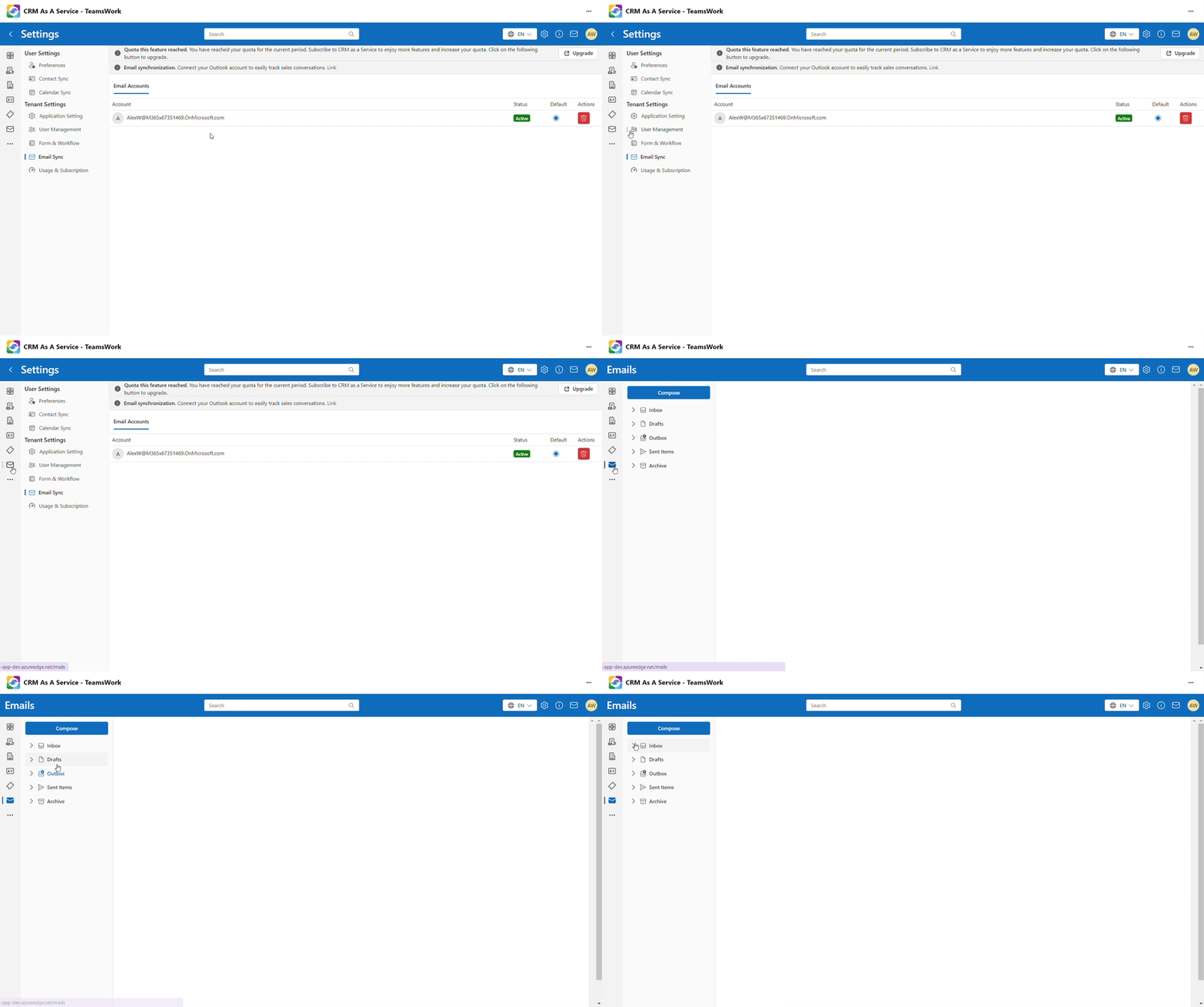
managing your email

Contextual Email Visibility

If you’ve configured both Private and Shared Mailbox Sync, any emails you receive from or send to a contact will appear under that contact’s History tab.

In the example below, I received an email from a Contact named Allan Deyoung. His email appears in Allan’s History tab.
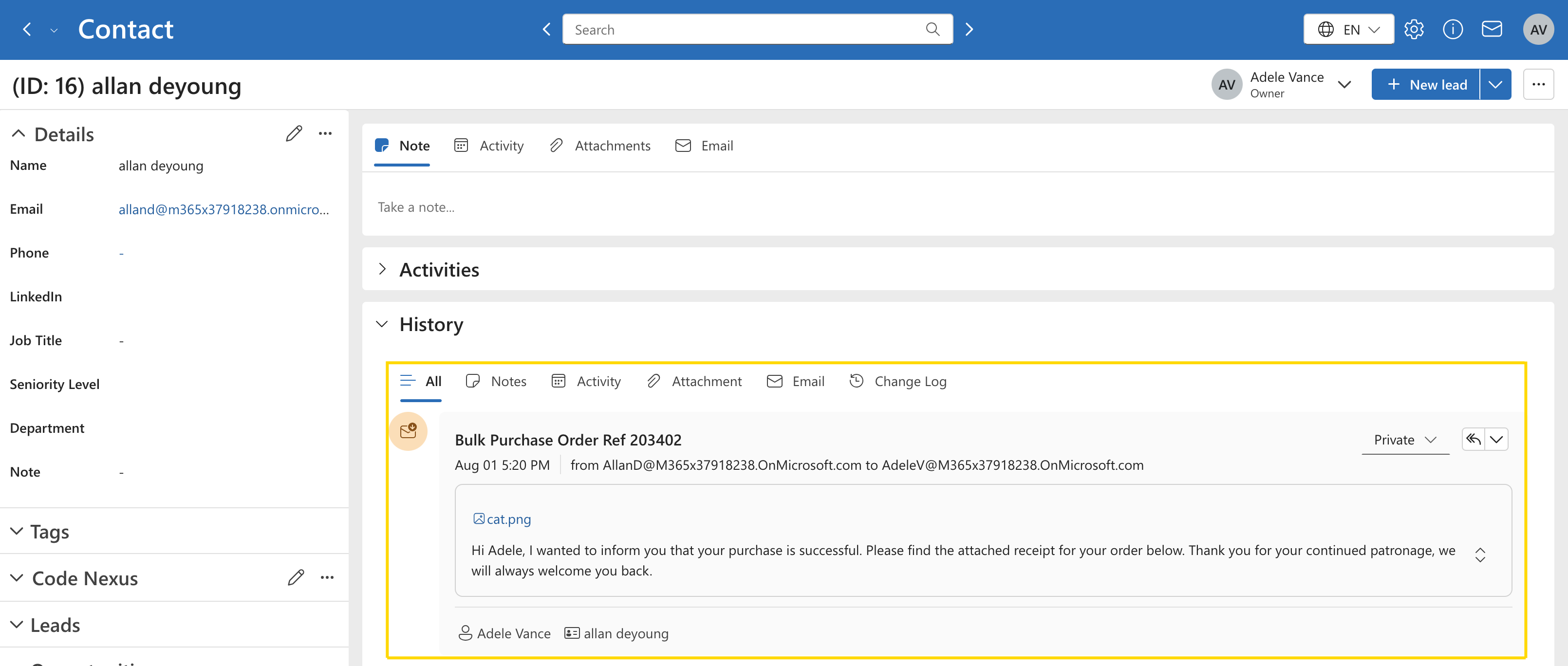
Received email from contact Allan Deyoung shown in the Contact's History tab in CRM As A Service.

When I replied to Allan, the outgoing email was also recorded in the same History tab.
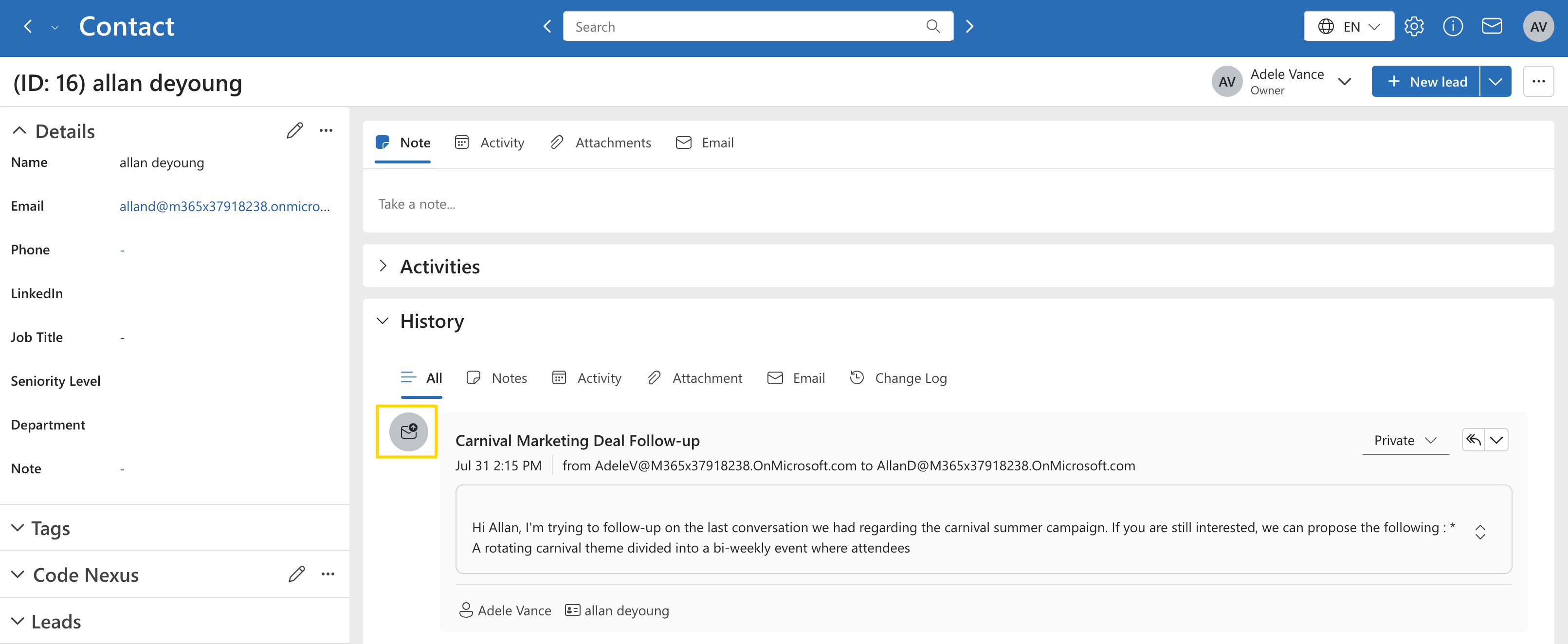
Sent email to contact Allan Deyoung displayed in the History tab with a different icon indicating an outgoing message.

CRM as a Service automatically captures the email conversation and links it to the relevant Lead, Opportunity, or Case associated with Allan.

Here, you can see that same email also appearing within the Opportunity tied to Allan.
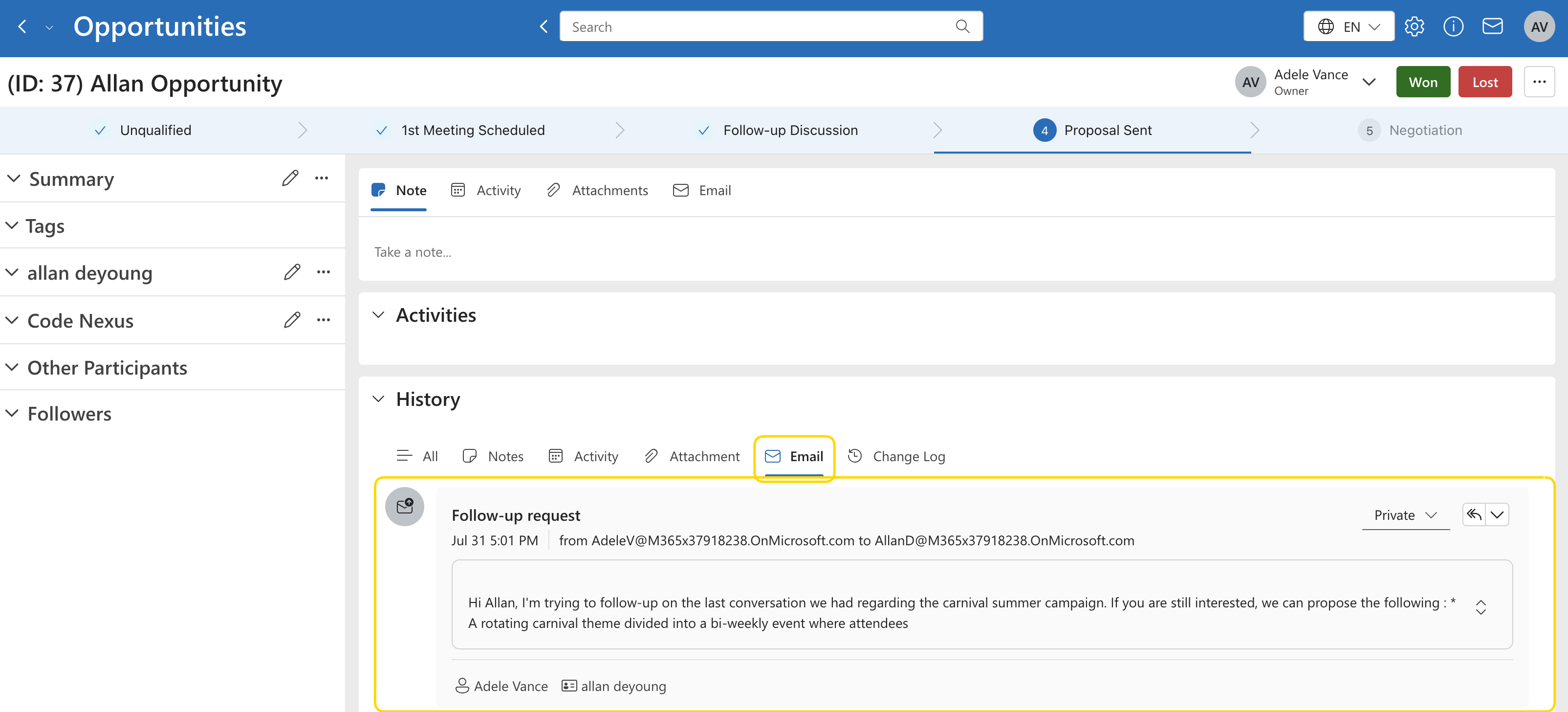
Email history visible in an Opportunity record linked to a Contact in CRM As A Service, showing synced communication context.

Note: Only emails sent or received after mailbox sync is configured will be visible in CRM.

Send Emails from CRM as a Service

You can send emails directly from the Activity form. This ensures that all communication is tracked within the CRM system, helping your team stay organized.
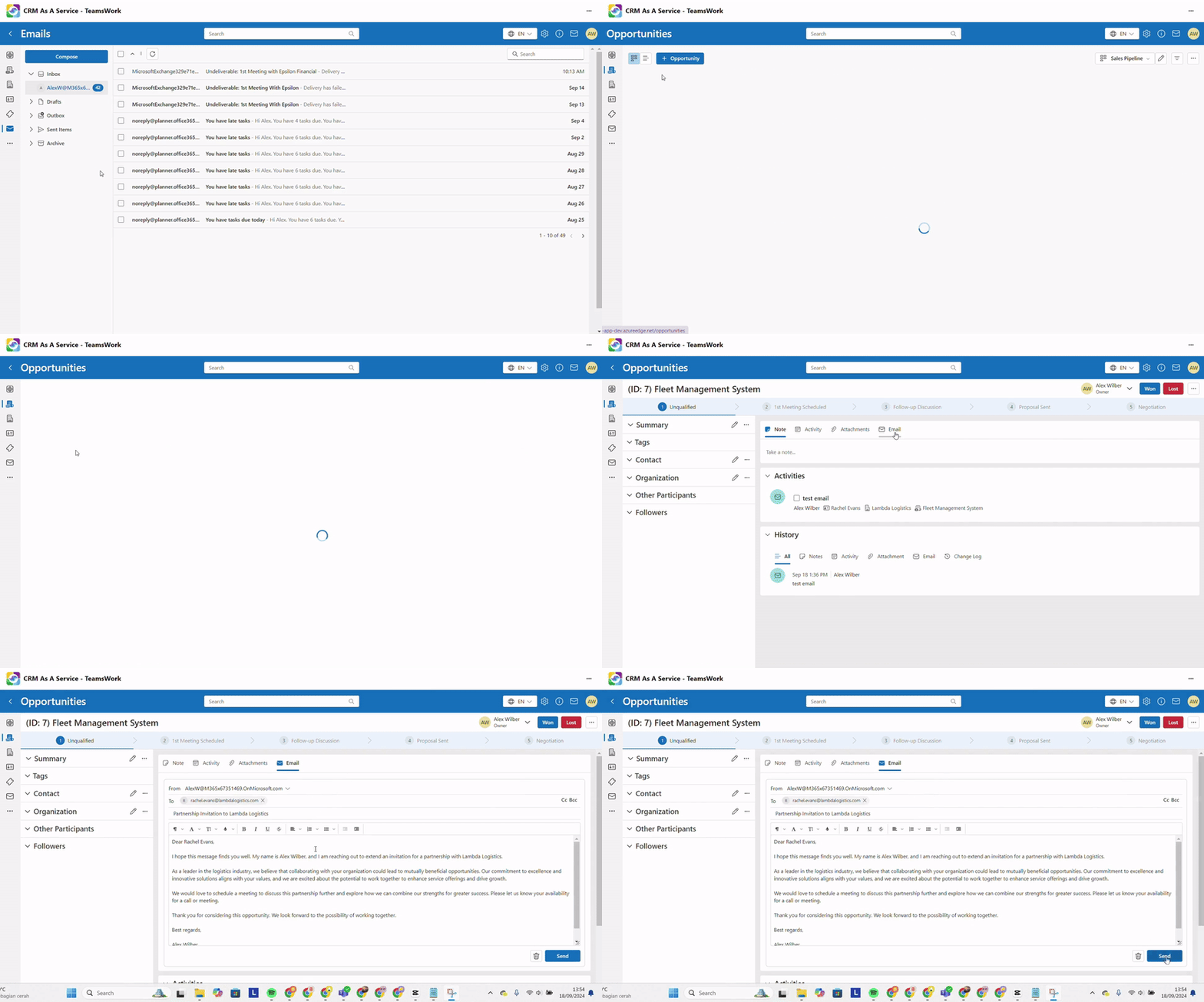
sending email from opportunity

Hope you enjoy this post!

Make the most of this powerful feature today and experience a tailored CRM management solution like never before.

Try CRM for Free Now!


Still switching tabs to get things done? TeamsWork brings your business apps into Microsoft Teams — Ticketing, CRM, Checklist, and Billing — so support, sales, and tasks all live where your team already works. Microsoft Solutions Partner certified, trusted by 500+ organizations.

Customer Review: Fresno Chaffee Zoo on Ticketing as a Service

Customer Review: Fresno Chaffee Zoo on Ticketing as a Service

Fresno Chaffee Zoo shares how Ticketing as a Service streamlined safety and security operations, cutting response times and improving cross-shift coordination.

Marc (TeamsWork) · Aug 19 · 3 min read

What Is Lead-to-Cash and How Does It Work?

What Is Lead-to-Cash and How Does It Work?

What is lead-to-cash? Learn the stages, how it differs from quote-to-cash, and how CRM and billing work together to support the sales process.

Marc (TeamsWork) · Aug 13 · 3 min read

Tax-Inclusive vs. Tax-Exclusive Pricing: What’s the Difference?

Tax-Inclusive vs. Tax-Exclusive Pricing: What’s the Difference?

Tax-inclusive and tax-exclusive pricing show customers different numbers for the same sale. Here's how each works, and which one fits your business.

Marc (TeamsWork) · Aug 10 · 4 min read

Billing Software vs. Accounting Software: Which One Do You Need?

Billing Software vs. Accounting Software: Which One Do You Need?

Billing software and accounting software aren't the same thing. Here's what each one does, and why most growing businesses use both.

Marc (TeamsWork) · Aug 10 · 3 min read

Invoicing Software vs. Excel: When to Make the Switch

Invoicing Software vs. Excel: When to Make the Switch

Compare invoicing software vs. Excel, see when spreadsheets stop working well, and learn what to consider before switching your billing process.

Marc (TeamsWork) · Aug 10 · 4 min read

SME Billing Software: What to Look for in 2026

SME Billing Software: What to Look for in 2026

What actually matters when evaluating billing software for a small or growing business, and the questions worth asking first.

Marc (TeamsWork) · Aug 10 · 5 min read

Quotation vs Sales Order vs Invoice: What's the Difference

Quotation vs Sales Order vs Invoice: What's the Difference

A clear breakdown of what a quotation, a sales order, and an invoice each do, and how the three connect in one sales process.

Marc (TeamsWork) · Aug 10 · 4 min read

Quote to Cash Explained: From Quotation to Paid Invoice

Quote to Cash Explained: From Quotation to Paid Invoice

A step-by-step look at the quote-to-cash process, from quotation to paid invoice, and where it breaks down for growing teams.

Marc (TeamsWork) · Aug 10 · 5 min read

How to Delete a Ticket in Ticketing as a Service

How to Delete a Ticket in Ticketing as a Service

You can now delete tickets in Ticketing as a Service. Here is who can do it, how it works, and what happens to your quota.

Marc (TeamsWork) · Aug 4 · 3 min read

Customer Review: SMU Healthcare on Ticketing as a Service

Customer Review: SMU Healthcare on Ticketing as a Service

SMU Healthcare shares how Ticketing as a Service transformed its customer support, from faster response times to better team collaboration.

Marc (TeamsWork) · Aug 3 · 2 min read

Desk365 vs TeamsWork: Pricing, Features & Alternatives 2026

Desk365 vs TeamsWork: Pricing, Features & Alternatives 2026

Compare Desk365 and TeamsWork Ticketing on features, per-agent vs per-organization pricing, free plans and Desk365 alternatives.

Marc (TeamsWork) · Jul 31 · 5 min read

Automatic Ticket Reassignment with Ticketing as a Service Webhooks

Automatic Ticket Reassignment with Ticketing as a Service Webhooks

Learn how to set up webhooks in Ticketing as a Service and connect them to Power Automate for real-time ticket workflow automation.

Marc (TeamsWork) · Jul 29 · 3 min read

Marketing Ticketing System for Microsoft Teams: Manage Creative Requests

Marketing Ticketing System for Microsoft Teams: Manage Creative Requests

A marketing ticketing system turns creative requests into tracked tickets. See how it works in Microsoft Teams and why IT's tool won't fit.

Marc (TeamsWork) · Jul 17 · 4 min read

Help Desk for Legal Teams in Microsoft Teams

Help Desk for Legal Teams in Microsoft Teams

Centralize legal requests, protect deadlines, and keep a full audit trail with help desk software built into Microsoft Teams.

Marc (TeamsWork) · Jul 16 · 5 min read

Keep Every Conversation in Context with Unified Chat

Keep Every Conversation in Context with Unified Chat

Keep every conversation in context with a dedicated Microsoft Teams chat for each record in CRM and Billing.

Marc (TeamsWork) · Jul 15 · 4 min read

Leverage the Opportunity Email Address to Save Client Emails

Leverage the Opportunity Email Address to Save Client Emails

Give every opportunity, lead, and case its own email address, so any message you send stays on that one record in CRM.

Marc (TeamsWork) · Jul 15 · 2 min read

SharePoint Ticketing System: Setup & Teams Alternative

SharePoint Ticketing System: Setup & Teams Alternative

How to build a SharePoint ticketing system, where it works well, and when Microsoft Teams is a better fit.

Marc (TeamsWork) · Jul 1 · 7 min read

SharePoint Ticketing System: Setup & Teams Alternative

SharePoint Ticketing System: Setup & Teams Alternative

How to build a SharePoint ticketing system, where it works well, and when Microsoft Teams is a better fit.

Marc (TeamsWork) · Jul 1 · 7 min read

Unlocking CRM as a Service in Claude Using an MCP Server

Unlocking CRM as a Service in Claude Using an MCP Server

Learn how to connect TeamsWork CRM as a Service to Claude so you can search, read, and update your CRM data in plain language — no code required.

Marc (TeamsWork) · Jun 24 · 6 min read

Unlocking CRM as a Service in Claude Using an MCP Server

Unlocking CRM as a Service in Claude Using an MCP Server

Learn how to connect TeamsWork CRM as a Service to Claude so you can search, read, and update your CRM data in plain language — no code required.

Marc (TeamsWork) · Jun 24 · 6 min read