
Preview of the new TeamsWork site · not the live website

How can I archive, restore, move a Ticketing instance?

Marc (TeamsWork) · Nov 9, 2023 · 2 min read · Updated: Oct 8, 2026

How can I archive, restore, move a Ticketing instance?

Managing ticketing instances within collaborative platforms may involve tasks such as moving an instance to a different channel or archiving and restoring it. This guide offers clear, step-by-step instructions to help you navigate these processes.

How to move a Ticketing Instance to another Channel

How to Archive a Ticketing Instance

How to Restore a Ticketing Instance

What if I have remove a channel instead of archiving a Ticketing instance.

How to restore a deleted channel

Archive and Restore Instance

How to move a Ticketing Instance to another Channel

To move an instance, you can follow these instructions:

  1. Archive a Ticketing Instance
  2. Restore a Ticketing Instance to a new Channel

How to Archive a Ticketing Instance

You can archive an entire ticketing instance by removing the associated tab.
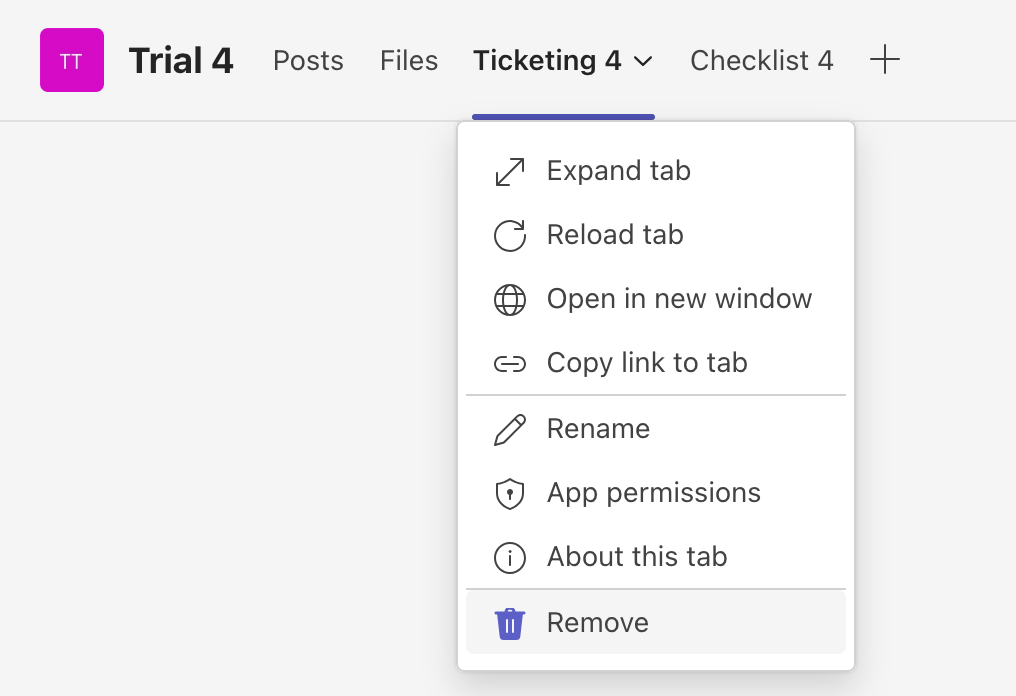
Remove from Tabulation

Should you need to revisit this instance, you can reinstate it by setting up a new ticketing instance and selecting the 'restore' option, rather than initiating a completely new ticketing instance.

It's important to note that restoration is only possible within the original channel where the ticketing instance was created.

How to restore an Archived Ticketing Instance

You can restore an archived Ticketing Instance by choosing the restore option during the instance creation steps
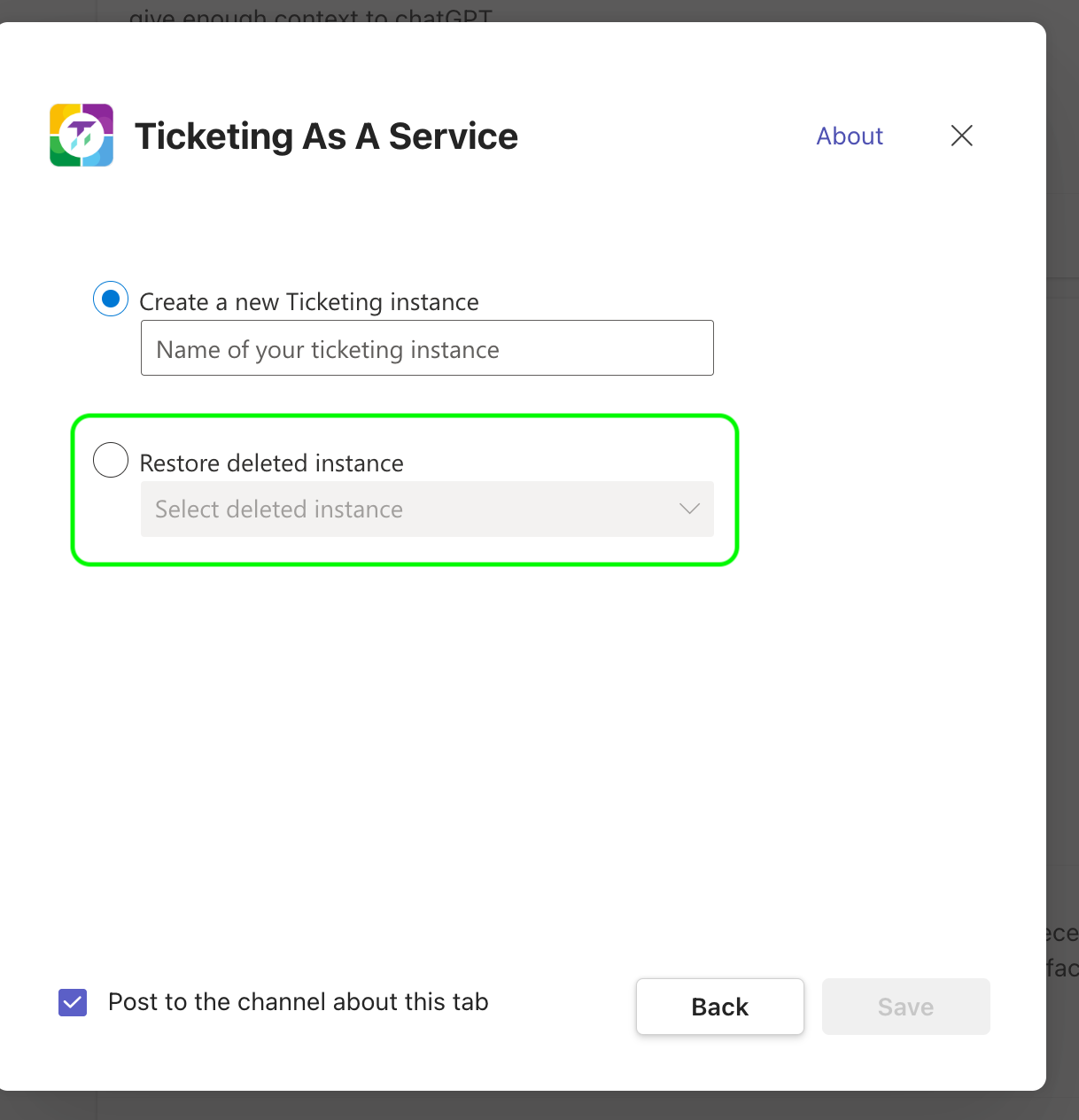
Restore deleted instance

Note that old chat bot notifications will point to the previous location resulting in this message when you click on it.

Any new chatbot notifications, after the instance has been move, will work flawlessly.
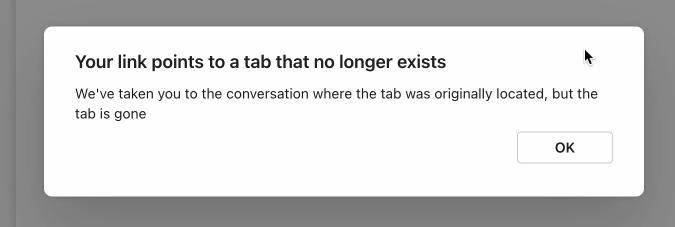
Tab no longer exists

What if I have remove a channel instead of archiving a Ticketing instance.

Removing a channel will result in the ticketing instance still existing in some areas of the app. For example, it will remain in the list of instances in the subscription tab (Settings area) or in the list of available instances in the Personal App.

If you try to click on one of the deleted instances, you will receive this below error message.

To properly remove a ticketing instance, you must first restore the channel (see next section), and then follow the instructions on how to archive an instance (see previous section).

Channel deleted
Tab no longer exists

How to restore a deleted channel

Click on "Manage team" in the channel menu.

Then click on the "Channels" tab. In the "Deleted" section, find the deleted channel and click on the corresponding "Restore" button.
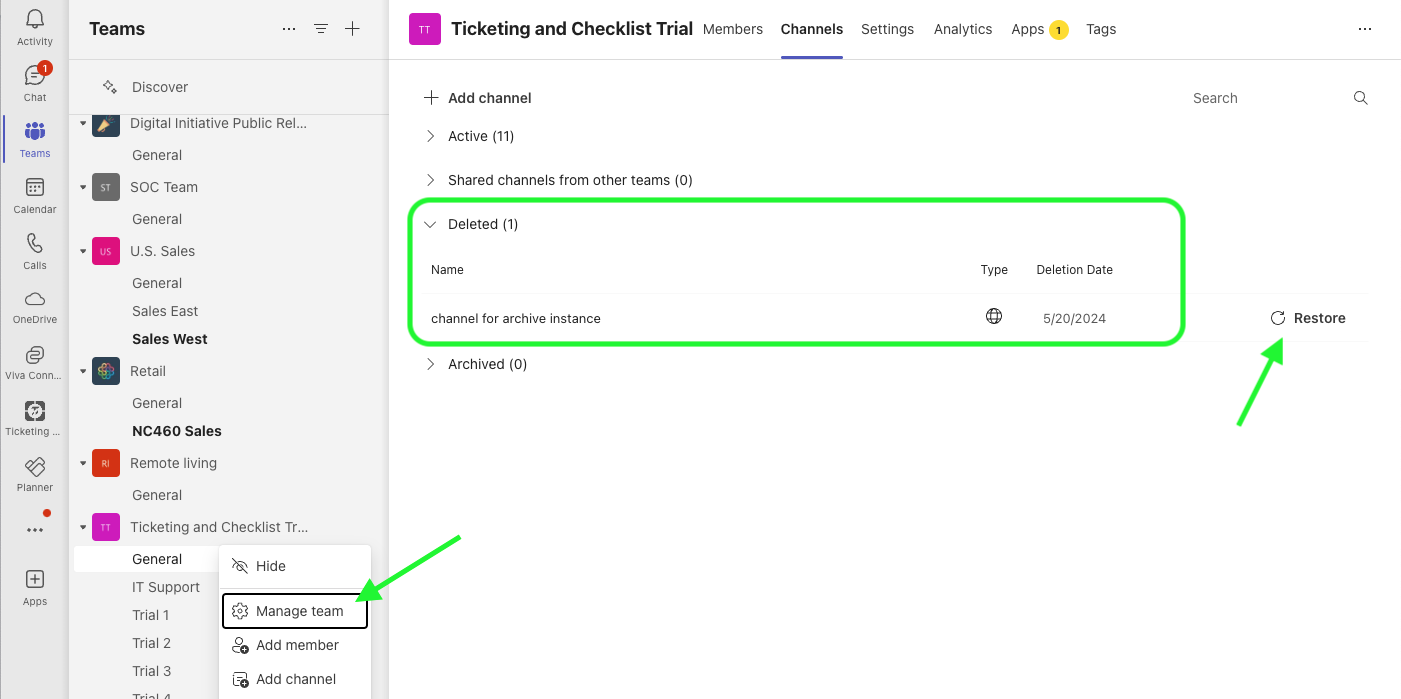
Restore deleted channel

I hope you have found this post helpful.

Please do not hesitate to reach out if you require any further assistance.
Marc

Contact Us


Still switching tabs to get things done? TeamsWork brings your business apps into Microsoft Teams — Ticketing, CRM, Checklist, and Billing — so support, sales, and tasks all live where your team already works. Microsoft Solutions Partner certified, trusted by 500+ organizations.

Customer Review: Fresno Chaffee Zoo on Ticketing as a Service

Customer Review: Fresno Chaffee Zoo on Ticketing as a Service

Fresno Chaffee Zoo shares how Ticketing as a Service streamlined safety and security operations, cutting response times and improving cross-shift coordination.

Marc (TeamsWork) · Aug 19 · 3 min read

What Is Lead-to-Cash and How Does It Work?

What Is Lead-to-Cash and How Does It Work?

What is lead-to-cash? Learn the stages, how it differs from quote-to-cash, and how CRM and billing work together to support the sales process.

Marc (TeamsWork) · Aug 13 · 3 min read

Tax-Inclusive vs. Tax-Exclusive Pricing: What’s the Difference?

Tax-Inclusive vs. Tax-Exclusive Pricing: What’s the Difference?

Tax-inclusive and tax-exclusive pricing show customers different numbers for the same sale. Here's how each works, and which one fits your business.

Marc (TeamsWork) · Aug 10 · 4 min read

Billing Software vs. Accounting Software: Which One Do You Need?

Billing Software vs. Accounting Software: Which One Do You Need?

Billing software and accounting software aren't the same thing. Here's what each one does, and why most growing businesses use both.

Marc (TeamsWork) · Aug 10 · 3 min read

Invoicing Software vs. Excel: When to Make the Switch

Invoicing Software vs. Excel: When to Make the Switch

Compare invoicing software vs. Excel, see when spreadsheets stop working well, and learn what to consider before switching your billing process.

Marc (TeamsWork) · Aug 10 · 4 min read

SME Billing Software: What to Look for in 2026

SME Billing Software: What to Look for in 2026

What actually matters when evaluating billing software for a small or growing business, and the questions worth asking first.

Marc (TeamsWork) · Aug 10 · 5 min read

Quotation vs Sales Order vs Invoice: What's the Difference

Quotation vs Sales Order vs Invoice: What's the Difference

A clear breakdown of what a quotation, a sales order, and an invoice each do, and how the three connect in one sales process.

Marc (TeamsWork) · Aug 10 · 4 min read

Quote to Cash Explained: From Quotation to Paid Invoice

Quote to Cash Explained: From Quotation to Paid Invoice

A step-by-step look at the quote-to-cash process, from quotation to paid invoice, and where it breaks down for growing teams.

Marc (TeamsWork) · Aug 10 · 5 min read

How to Delete a Ticket in Ticketing as a Service

How to Delete a Ticket in Ticketing as a Service

You can now delete tickets in Ticketing as a Service. Here is who can do it, how it works, and what happens to your quota.

Marc (TeamsWork) · Aug 4 · 3 min read

Customer Review: SMU Healthcare on Ticketing as a Service

Customer Review: SMU Healthcare on Ticketing as a Service

SMU Healthcare shares how Ticketing as a Service transformed its customer support, from faster response times to better team collaboration.

Marc (TeamsWork) · Aug 3 · 2 min read

Desk365 vs TeamsWork: Pricing, Features & Alternatives 2026

Desk365 vs TeamsWork: Pricing, Features & Alternatives 2026

Compare Desk365 and TeamsWork Ticketing on features, per-agent vs per-organization pricing, free plans and Desk365 alternatives.

Marc (TeamsWork) · Jul 31 · 5 min read

Automatic Ticket Reassignment with Ticketing as a Service Webhooks

Automatic Ticket Reassignment with Ticketing as a Service Webhooks

Learn how to set up webhooks in Ticketing as a Service and connect them to Power Automate for real-time ticket workflow automation.

Marc (TeamsWork) · Jul 29 · 3 min read

Marketing Ticketing System for Microsoft Teams: Manage Creative Requests

Marketing Ticketing System for Microsoft Teams: Manage Creative Requests

A marketing ticketing system turns creative requests into tracked tickets. See how it works in Microsoft Teams and why IT's tool won't fit.

Marc (TeamsWork) · Jul 17 · 4 min read

Help Desk for Legal Teams in Microsoft Teams

Help Desk for Legal Teams in Microsoft Teams

Centralize legal requests, protect deadlines, and keep a full audit trail with help desk software built into Microsoft Teams.

Marc (TeamsWork) · Jul 16 · 5 min read

Keep Every Conversation in Context with Unified Chat

Keep Every Conversation in Context with Unified Chat

Keep every conversation in context with a dedicated Microsoft Teams chat for each record in CRM and Billing.

Marc (TeamsWork) · Jul 15 · 4 min read

Leverage the Opportunity Email Address to Save Client Emails

Leverage the Opportunity Email Address to Save Client Emails

Give every opportunity, lead, and case its own email address, so any message you send stays on that one record in CRM.

Marc (TeamsWork) · Jul 15 · 2 min read

SharePoint Ticketing System: Setup & Teams Alternative

SharePoint Ticketing System: Setup & Teams Alternative

How to build a SharePoint ticketing system, where it works well, and when Microsoft Teams is a better fit.

Marc (TeamsWork) · Jul 1 · 7 min read

SharePoint Ticketing System: Setup & Teams Alternative

SharePoint Ticketing System: Setup & Teams Alternative

How to build a SharePoint ticketing system, where it works well, and when Microsoft Teams is a better fit.

Marc (TeamsWork) · Jul 1 · 7 min read

Unlocking CRM as a Service in Claude Using an MCP Server

Unlocking CRM as a Service in Claude Using an MCP Server

Learn how to connect TeamsWork CRM as a Service to Claude so you can search, read, and update your CRM data in plain language — no code required.

Marc (TeamsWork) · Jun 24 · 6 min read

Unlocking CRM as a Service in Claude Using an MCP Server

Unlocking CRM as a Service in Claude Using an MCP Server

Learn how to connect TeamsWork CRM as a Service to Claude so you can search, read, and update your CRM data in plain language — no code required.

Marc (TeamsWork) · Jun 24 · 6 min read