
Preview of the new TeamsWork site · not the live website

How to Uninstall and Block Access to Your TeamsWork App

Marc (TeamsWork) · May 17, 2022 · 3 min read · Updated: Oct 8, 2026

How to Uninstall and Block Access to Your TeamsWork App

Hi all,

If you no longer need the TeamsWork app and want to remove or restrict access for everyone in your organization, it's essential to manage these settings correctly. In this guide, we’ll walk you through how to:

Uninstall an app
Block access to an app (Admin Only)
Remove the Automatic Installation Configuration (Admin Only)

Uninstalling a TeamsWork App from Microsoft Teams

TeamsWork apps typically have both a personal app (installed for individual users) and an instance app (installed in a channel). Uninstalling the personal app from your account removes it for you, but if the app is installed in a channel, it must be removed separately. Here is how to uninstall:

Removing the Personal App

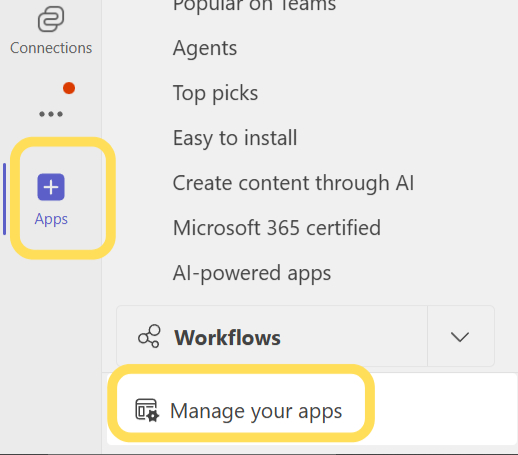
1) Click Apps and Click Manage your apps.
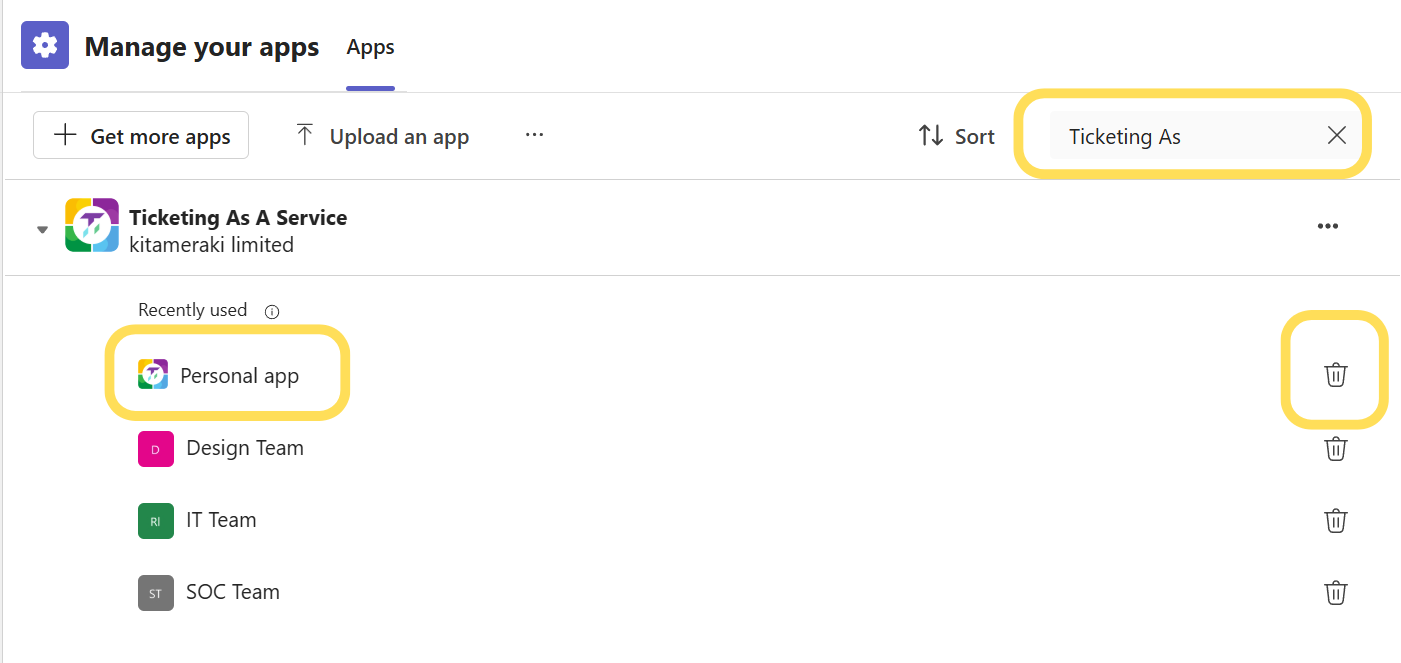
2) Search for the app and Click on the app. Select the Trash Bin icon on the Personal App to Remove it. This will only remove the app for your personal use; other users will still be able to access their personal app.
Removing the App From All Channel

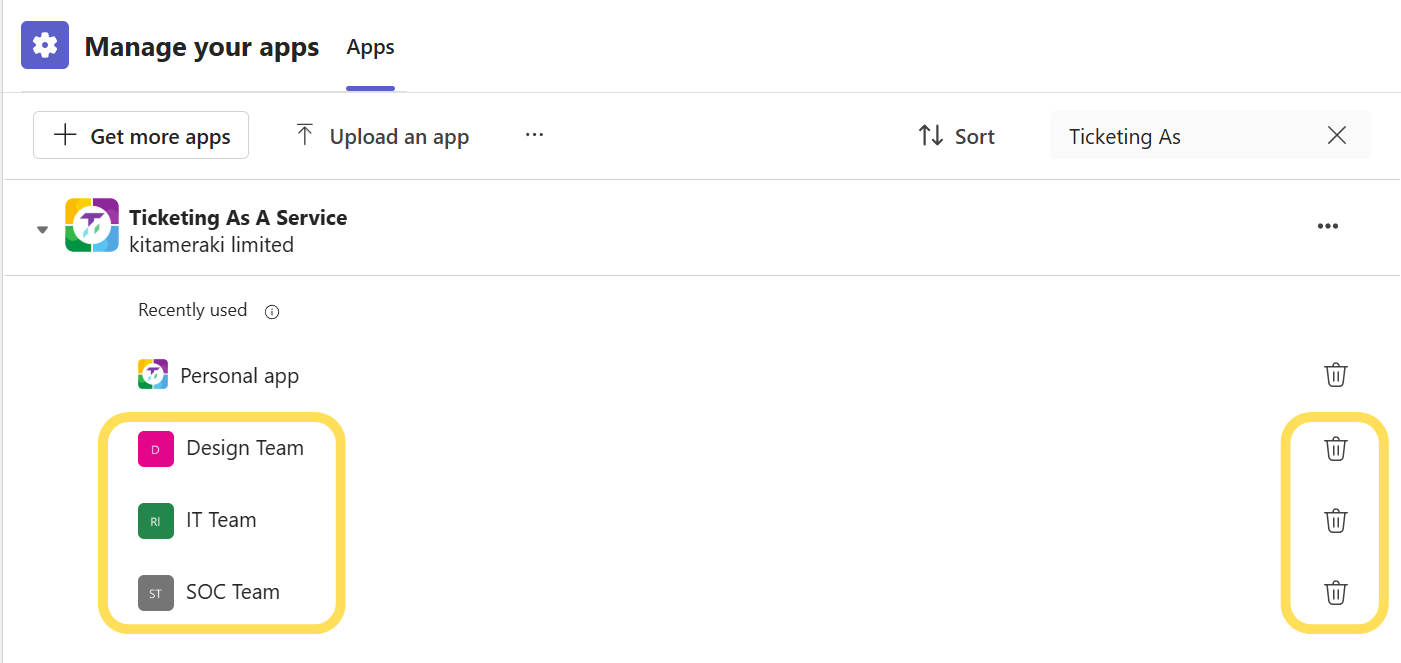
Select the Trash Bin icon on the teams channel to Remove the app. This will remove the app from the specific team channel, and other users will no longer have access to it in that channel.
Blocking Access to the App (Admin Only)

Blocking an app in the Microsoft Teams Admin Center prevents anyone in your organization from installing or using it. When an app is blocked, it is automatically removed from all user accounts and deleted from any Teams channels where it was previously installed. Additionally, any associated features, such as the ticketing chatbot, will be disabled, and users will no longer be able to reinstall the app. Here’s how to block an app:

1) Open the Microsoft Teams Admin Center (https://admin.teams.microsoft.com/)

2) Select Manage Apps.
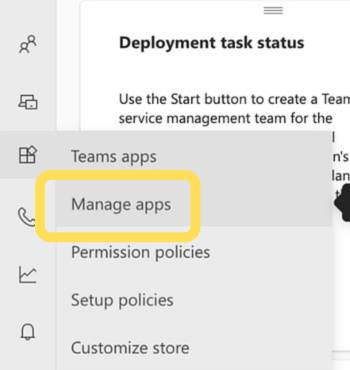
Click manage apps

3) Search for the app name and then click on it to open it.
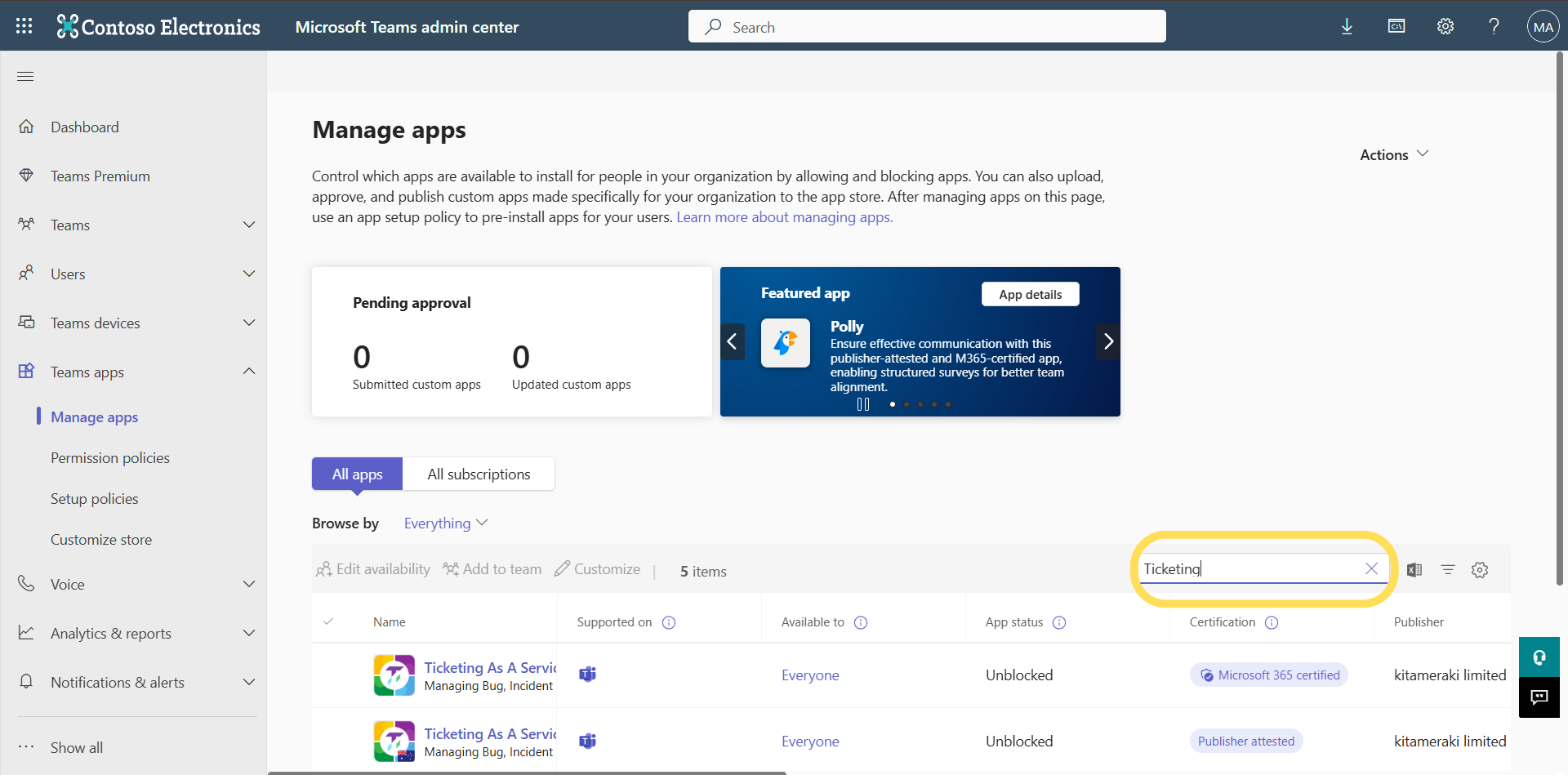
Search app and open

4) Navigate to the ellipsis (three dots) > select Action > then click Block app.
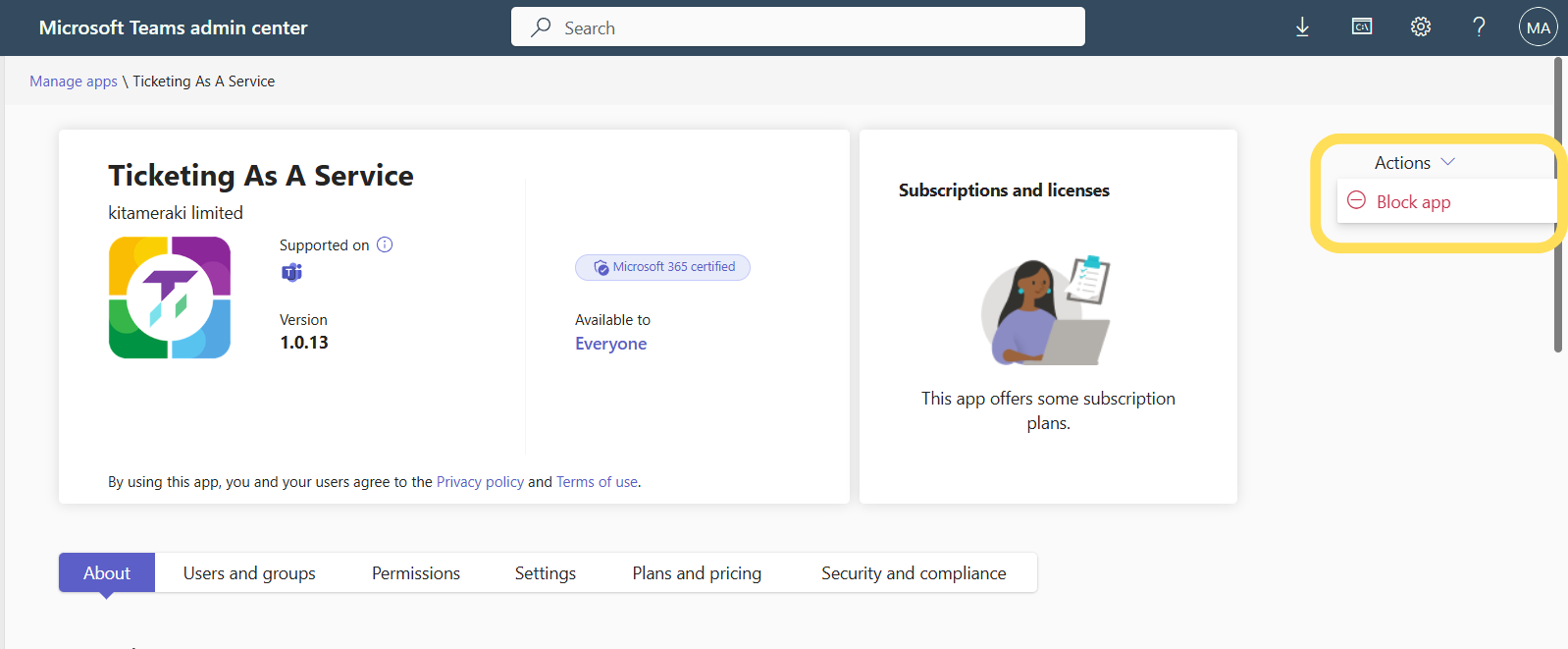
Block app

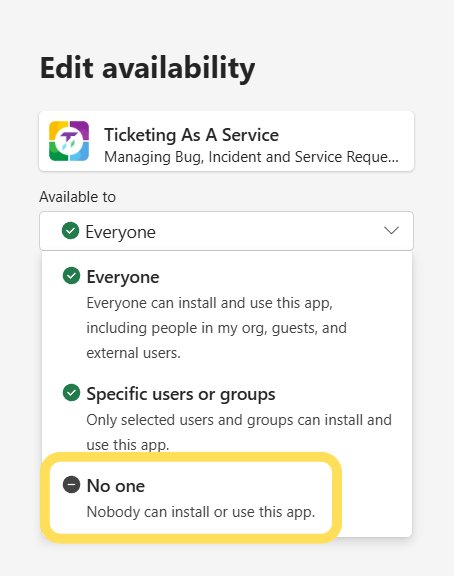
5) Remove Availability to User and Groups:

  • Click Users and groups and Click edit availability.
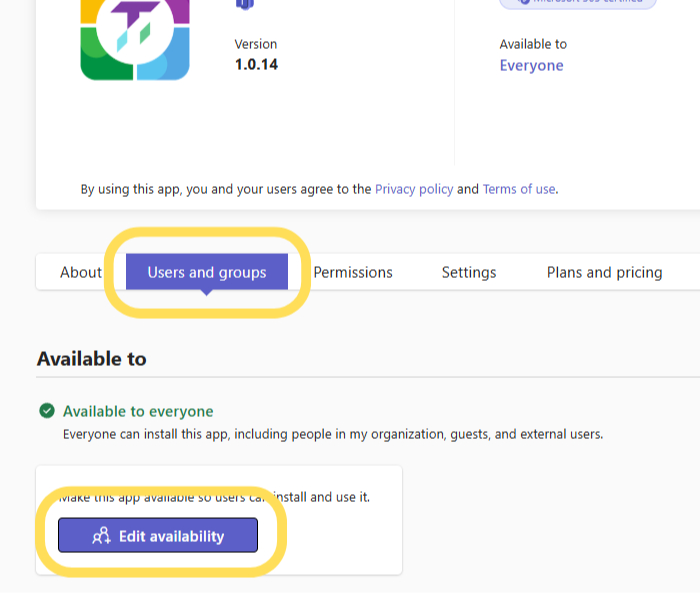
  • Choose No one.

To regain access of the app, check our guide on how to unblock an app.

Remove the Automatic Installation Configuration for an App Across All Users (Admin Only)

If you used a Teams policy to Automatically Install and Pin an App to all users, follow theses steps to remove this Teams policy.

1) As a Teams administrator, navigate to the App setup policy section: (https://admin.teams.microsoft.com/policies/app-setup)

2) Click on the Global (Org-wide default) policy.
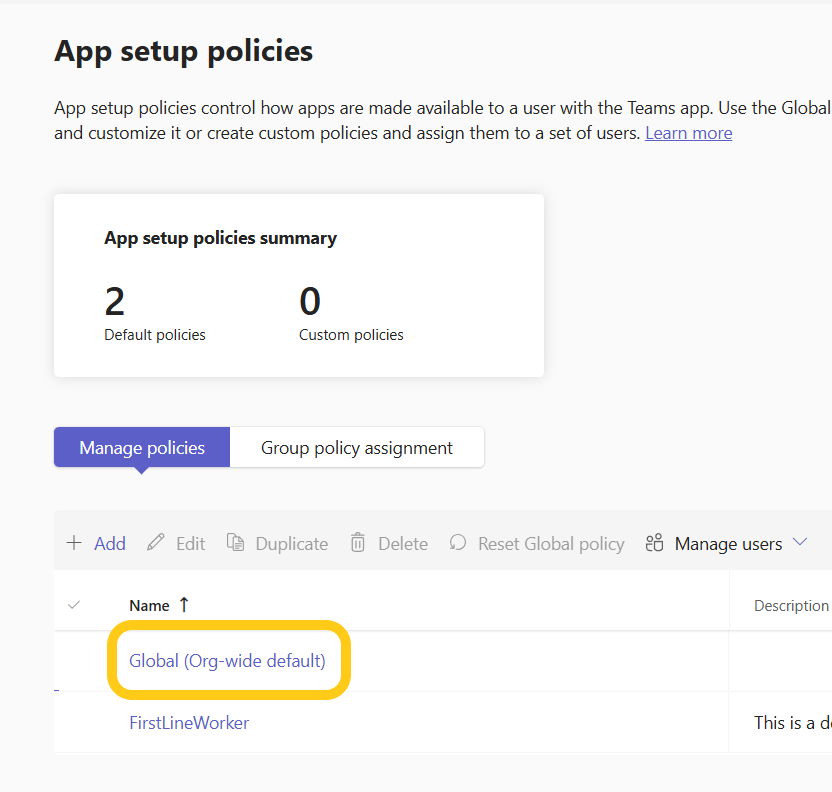
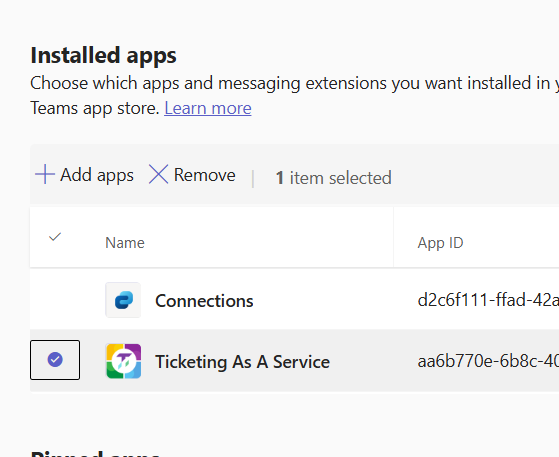
3) In the Installed apps section, Select the app and click X Remove.
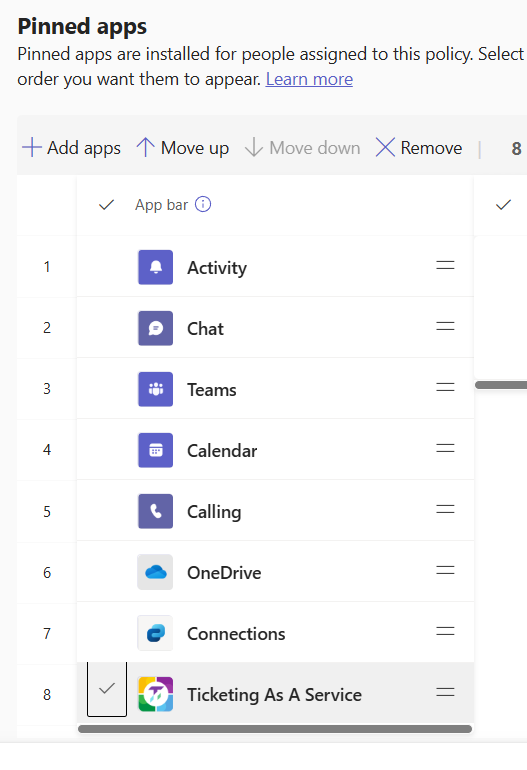
4) In the Pinned apps section, Select the app and click X Remove.
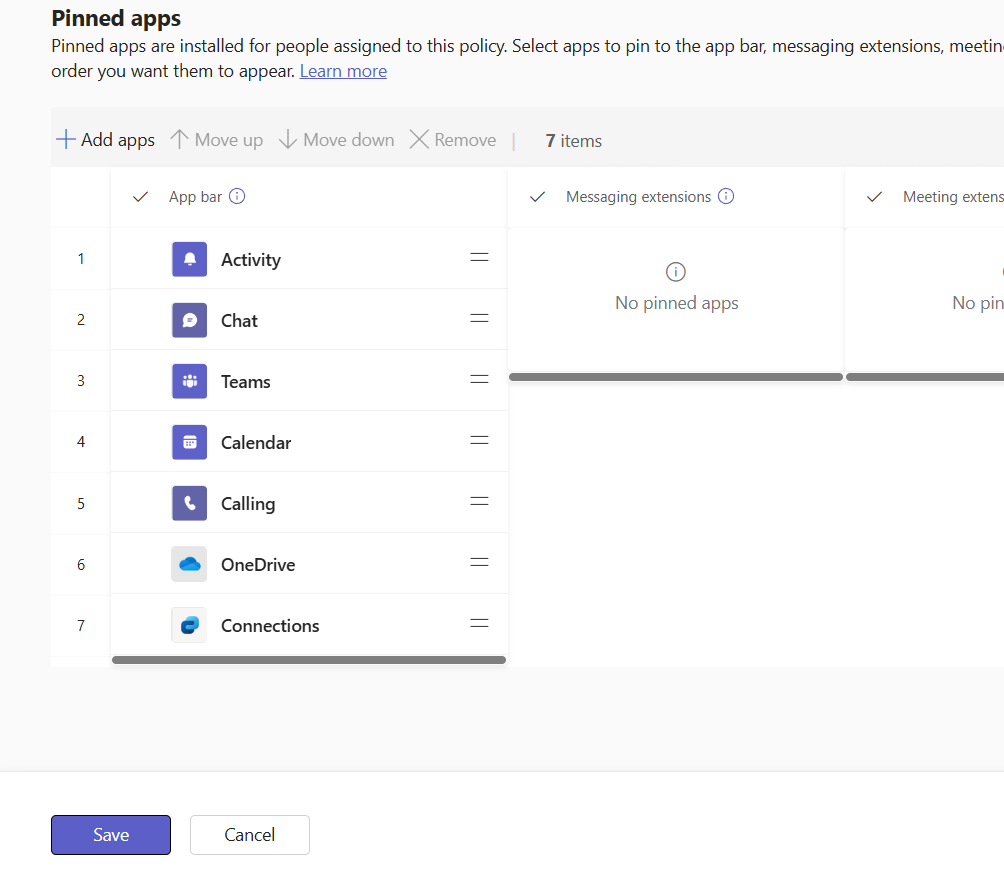
5) After removing the app, click Save
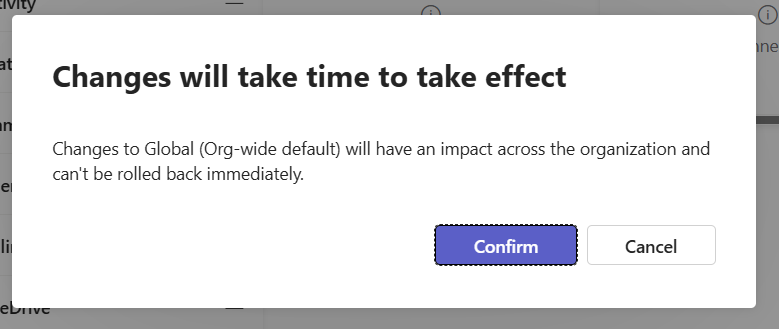
Please Note that you may need to wait a while before it is applied to all users.
Your Feedback Matters to Us

We value your feedback and are always looking to improve our apps. If our app did not meet your expectations, we’d love to hear what features were missing or how we could enhance your experience.

Your input helps us refine our solutions to better meet user needs. Please share your thoughts by filling out our contact form.

Have a great day.

Marc


Still switching tabs to get things done? TeamsWork brings your business apps into Microsoft Teams — Ticketing, CRM, Checklist, and Billing — so support, sales, and tasks all live where your team already works. Microsoft Solutions Partner certified, trusted by 500+ organizations.

Customer Review: Fresno Chaffee Zoo on Ticketing as a Service

Customer Review: Fresno Chaffee Zoo on Ticketing as a Service

Fresno Chaffee Zoo shares how Ticketing as a Service streamlined safety and security operations, cutting response times and improving cross-shift coordination.

Marc (TeamsWork) · Aug 19 · 3 min read

What Is Lead-to-Cash and How Does It Work?

What Is Lead-to-Cash and How Does It Work?

What is lead-to-cash? Learn the stages, how it differs from quote-to-cash, and how CRM and billing work together to support the sales process.

Marc (TeamsWork) · Aug 13 · 3 min read

Tax-Inclusive vs. Tax-Exclusive Pricing: What’s the Difference?

Tax-Inclusive vs. Tax-Exclusive Pricing: What’s the Difference?

Tax-inclusive and tax-exclusive pricing show customers different numbers for the same sale. Here's how each works, and which one fits your business.

Marc (TeamsWork) · Aug 10 · 4 min read

Billing Software vs. Accounting Software: Which One Do You Need?

Billing Software vs. Accounting Software: Which One Do You Need?

Billing software and accounting software aren't the same thing. Here's what each one does, and why most growing businesses use both.

Marc (TeamsWork) · Aug 10 · 3 min read

Invoicing Software vs. Excel: When to Make the Switch

Invoicing Software vs. Excel: When to Make the Switch

Compare invoicing software vs. Excel, see when spreadsheets stop working well, and learn what to consider before switching your billing process.

Marc (TeamsWork) · Aug 10 · 4 min read

SME Billing Software: What to Look for in 2026

SME Billing Software: What to Look for in 2026

What actually matters when evaluating billing software for a small or growing business, and the questions worth asking first.

Marc (TeamsWork) · Aug 10 · 5 min read

Quotation vs Sales Order vs Invoice: What's the Difference

Quotation vs Sales Order vs Invoice: What's the Difference

A clear breakdown of what a quotation, a sales order, and an invoice each do, and how the three connect in one sales process.

Marc (TeamsWork) · Aug 10 · 4 min read

Quote to Cash Explained: From Quotation to Paid Invoice

Quote to Cash Explained: From Quotation to Paid Invoice

A step-by-step look at the quote-to-cash process, from quotation to paid invoice, and where it breaks down for growing teams.

Marc (TeamsWork) · Aug 10 · 5 min read

How to Delete a Ticket in Ticketing as a Service

How to Delete a Ticket in Ticketing as a Service

You can now delete tickets in Ticketing as a Service. Here is who can do it, how it works, and what happens to your quota.

Marc (TeamsWork) · Aug 4 · 3 min read

Customer Review: SMU Healthcare on Ticketing as a Service

Customer Review: SMU Healthcare on Ticketing as a Service

SMU Healthcare shares how Ticketing as a Service transformed its customer support, from faster response times to better team collaboration.

Marc (TeamsWork) · Aug 3 · 2 min read

Desk365 vs TeamsWork: Pricing, Features & Alternatives 2026

Desk365 vs TeamsWork: Pricing, Features & Alternatives 2026

Compare Desk365 and TeamsWork Ticketing on features, per-agent vs per-organization pricing, free plans and Desk365 alternatives.

Marc (TeamsWork) · Jul 31 · 5 min read

Automatic Ticket Reassignment with Ticketing as a Service Webhooks

Automatic Ticket Reassignment with Ticketing as a Service Webhooks

Learn how to set up webhooks in Ticketing as a Service and connect them to Power Automate for real-time ticket workflow automation.

Marc (TeamsWork) · Jul 29 · 3 min read

Marketing Ticketing System for Microsoft Teams: Manage Creative Requests

Marketing Ticketing System for Microsoft Teams: Manage Creative Requests

A marketing ticketing system turns creative requests into tracked tickets. See how it works in Microsoft Teams and why IT's tool won't fit.

Marc (TeamsWork) · Jul 17 · 4 min read

Help Desk for Legal Teams in Microsoft Teams

Help Desk for Legal Teams in Microsoft Teams

Centralize legal requests, protect deadlines, and keep a full audit trail with help desk software built into Microsoft Teams.

Marc (TeamsWork) · Jul 16 · 5 min read

Keep Every Conversation in Context with Unified Chat

Keep Every Conversation in Context with Unified Chat

Keep every conversation in context with a dedicated Microsoft Teams chat for each record in CRM and Billing.

Marc (TeamsWork) · Jul 15 · 4 min read

Leverage the Opportunity Email Address to Save Client Emails

Leverage the Opportunity Email Address to Save Client Emails

Give every opportunity, lead, and case its own email address, so any message you send stays on that one record in CRM.

Marc (TeamsWork) · Jul 15 · 2 min read

SharePoint Ticketing System: Setup & Teams Alternative

SharePoint Ticketing System: Setup & Teams Alternative

How to build a SharePoint ticketing system, where it works well, and when Microsoft Teams is a better fit.

Marc (TeamsWork) · Jul 1 · 7 min read

SharePoint Ticketing System: Setup & Teams Alternative

SharePoint Ticketing System: Setup & Teams Alternative

How to build a SharePoint ticketing system, where it works well, and when Microsoft Teams is a better fit.

Marc (TeamsWork) · Jul 1 · 7 min read

Unlocking CRM as a Service in Claude Using an MCP Server

Unlocking CRM as a Service in Claude Using an MCP Server

Learn how to connect TeamsWork CRM as a Service to Claude so you can search, read, and update your CRM data in plain language — no code required.

Marc (TeamsWork) · Jun 24 · 6 min read

Unlocking CRM as a Service in Claude Using an MCP Server

Unlocking CRM as a Service in Claude Using an MCP Server

Learn how to connect TeamsWork CRM as a Service to Claude so you can search, read, and update your CRM data in plain language — no code required.

Marc (TeamsWork) · Jun 24 · 6 min read