

API Reference
For Checklist As A Service
Welcome to the API Reference for Checklist as a Service! This comprehensive developer's guide is your key to seamlessly integrating checklist functionality into your applications.


Whether you're looking to automate checklist creation, extract valuable task data for reporting, or enhance your existing tools with checklist features, this documentation is your go-to resource. Explore the wide range of endpoints, methods, and parameters available to create, retrieve, and update checklists, tasks, and activities. Get ready to revolutionize your checklist experience!
PRODUCTION BASE URL FOR TICKETING GLOBAL (US)
Checklist API follows REST industry-standard practices, using widely supported HTTP methods such as GET, POST, PUT, and PATCH.
END POINTS
You can download the OpenAPI Specs JSON file below and use it with Swagger tool, or try it directly in our Endpoints section. See the list of Checklist End Points.
BULK UPDATE AND RATE LIMITING
Checklist API doesn't support bulk updates. You can work on only one object per request.
There is a rate limit in place that allows for a maximum of 100 queries per 60 seconds to ensure system stability.
AUTHENTICATION
To ensure secure authentication with our Checklist as a Service REST API, we utilize an API key as an authentication parameter. You have the option to use either the primary or secondary key for authentication purposes.
To access your API key, please follow these steps:
-
Navigate to the Checklist App settings area.
-
Look for the API key section within the settings.
-
You will find both the primary and secondary keys listed.
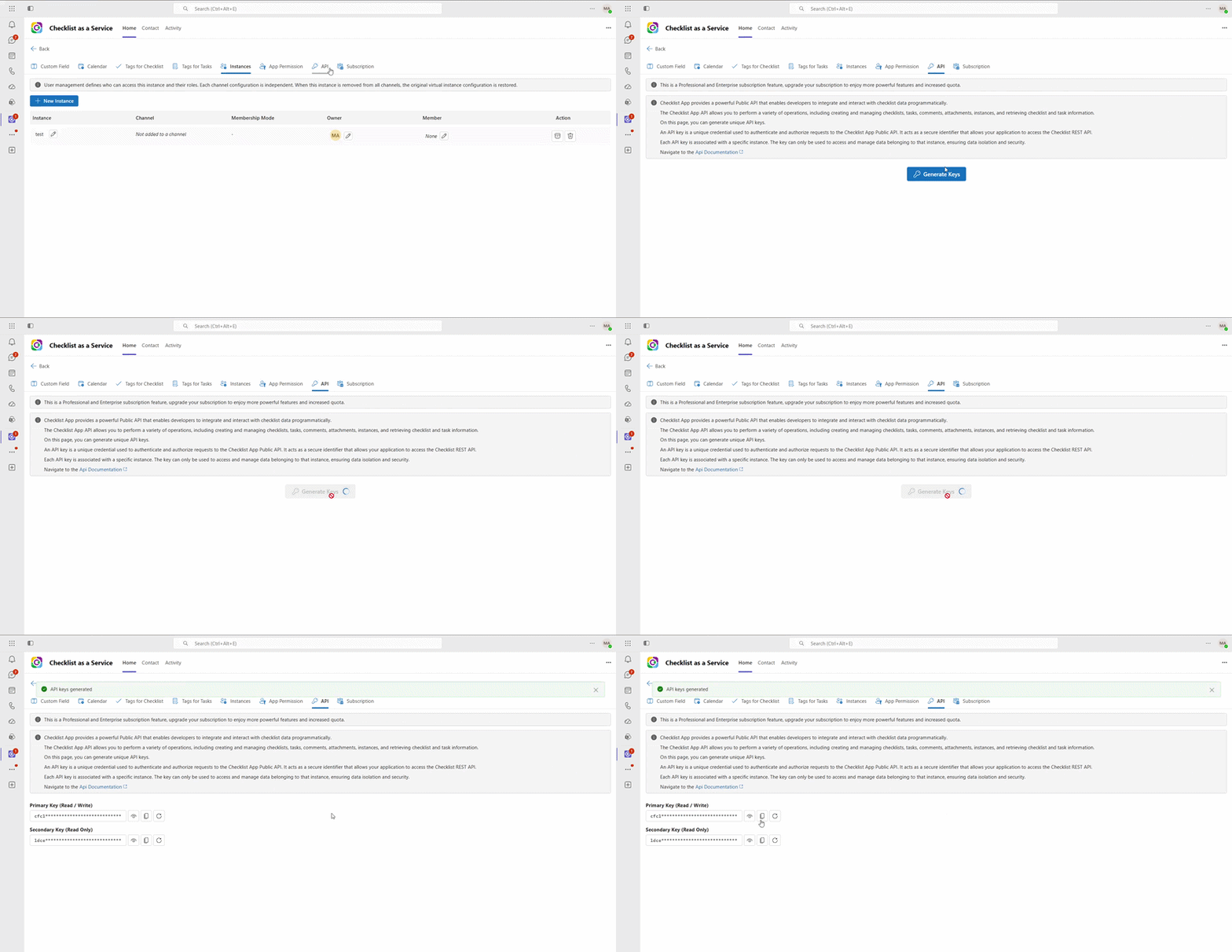
Please note that the API key provided for authentication purposes in the setting area is valid only for a single checklist instance.
When making API requests, include the API key as a request header (Ocp-Apim-Subscription-Key). This will authenticate your requests and grant you access to the desired functionalities of Checklist API.
Ocp-Apim-Subscription-Key: YOUR_API_KEY
Remember to handle your API keys with care and keep them secure. They provide access to your Checklist as a Service account, and misuse or unauthorized access to the API keys can compromise the security of your system.
If you have any further questions or need assistance regarding API key authentication or any other aspect of our Checklist as a Service API, please don't hesitate to reach out to our support team. We are here to help you integrate and leverage the power of our API seamlessly.
SANDBOX ENVIRONMENT
We recommend setting up your own sandbox or test environment. Having a dedicated test environment allows you to safely and securely test your integrations, functionality, and API calls without affecting your live or production environment.
ERRORS
Checklist API uses conventional HTTP response codes to indicate the success or failure of an API request. In general: Codes in the 2xx range indicate success. Codes in the 4xx range indicate an error that failed given the information provided (e.g., a required parameter was omitted, etc.). Codes in the 5xx range indicate an error with Checklist's servers. Some 4xx errors that could be handled programmatically include an error code that briefly explains the error reported.
PAGINATION
For some top level API resources, Checklist API provide pagination functionality to allow you to retrieve large datasets in a controlled and manageable manner. To implement pagination, we use a "limit" parameter together with a continuationToken.
limit: indicates the number of records to return in each page using the query parameter.
The response of a list API method represents a single page in a reverse chronological stream of objects.
CONTINUATION TOKEN
To retrieve large datasets across multiple pages, you can utilize the continuationToken mechanism. The continuationToken allows you to fetch subsequent pages of data without having to manually manage offsets.
Here's how you can implement auto-pagination using the continuationToken:
-
Make an initial API request to retrieve the first page of data, including a specified limit parameter for the number of records per page.
Example:
GET [Base URL]/checklists?limit=50
2. Check the response for the presence of the continuationToken field. If it exists, it indicates that there are additional pages of data available.
3. To fetch the next page of data, make a subsequent API request and include the continuationToken as a header parameter.
Repeat steps 2 and 3 until there is no continuationToken in the response, indicating that you have retrieved all the available data.
USER
See IUser in the Schema
A user is represented by an ID, name, and email. For users from your Microsoft 365 organization, it's important to ensure that this information remains consistent. Please note that the Checklist API does not verify the consistency between the user's ID, name, and email.
If you require the ID, name, and email of a user, you can refer to the corresponding Object ID, Display Name, and Email attributes in Azure.
CUSTOM FIELDS
In the Checklist API, you can fetch custom field information as well as populate these custom fields when creating new checklists or tasks using the unique identifier associated with each custom field.
Your custom fields information can be found in the instance end-point.