

How to Cancel Your Teamswork Subscription: Step-by-Step Guide

Bijgewerkt op: 6 dagen geleden
Teamswork subscriptions can be cancelled through Microsoft Teams AppSource, Azure Marketplace, or Stripe. Follow the steps for the platform you used to subscribe.
Teamswork Subscription Cancellation Policy
Microsoft provides a 72-hour grace period after the start of a SaaS subscription during which you may cancel without penalty. After this grace period, cancellation is still possible; however, you will be billed for the full remaining term of the subscription, and no refunds will be issued.
There will be 3 sections on this blogpost:
Cancel Teams/AppSource Subscription
You can cancel your subscription plan directly in Teams. Please follow these simple steps to cancel your subscription:
Go to the Microsoft 365 Admin console.
Locate your TeamsWork subscription and click on it to open the detail page.
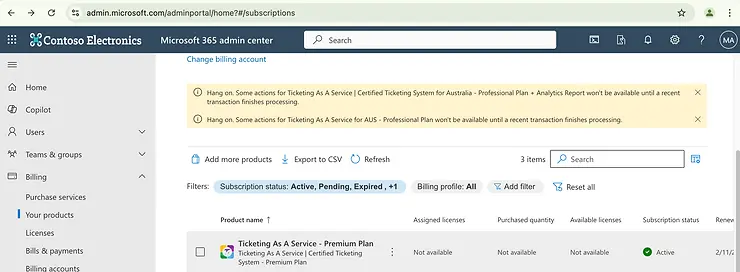
On the subscription detail page, click on Cancel subscription.

A confirmation pop-up will appear. Select Cancel subscription to proceed.

Cancel Azure Subscription
To cancel your subscription plan using Azure. Please follow these simple steps:


Cancel Stripe Subscription
Go to: https://billing.stripe.com/p/login/28oeXG55a4ub1YA5kk

Use the same email that you used for the subscription. If you have a Stripe account, you will receive an email to access your Stripe account. Don't forget to check your spam folder if you don't receive any email.
Click on the Login button in the email, this will navigate back to Stripe website and open your account

Click on a subscription invoice to locate the cancellation option.
If you run into any issues during the cancellation process, contact us.