

API Reference for Ticketing as a Service
Integrate ticketing into your applications: authenticate, paginate, and call the REST endpoints.
Overview
Welcome to the API Reference for Ticketing as a Service! This developer guide is your key to integrating ticketing into your applications.
Whether you are looking to automate ticket creation, extract ticket data for reporting, or enhance your existing tools with ticketing features, explore the endpoints, methods, and parameters available to create, retrieve, and update tickets and activities.
Ticketing API follows REST industry-standard practices, using widely supported HTTP methods such as GET, POST, and PUT.
Production base URLs
Use the base URL for the region where your Ticketing instance is hosted.
| Region | Base URL |
|---|---|
| Global (US) | https://teamswork.azure-api.net/ticketing/v1 |
| EU (EMEA) | https://ticketing-apim-eu.azure-api.net/ticketing/v1 |
| APAC (AUS) | https://ticketing-apim-aus.azure-api.net/ticketing/v1 |
Endpoints
Download the OpenAPI specs JSON file and use it with the Swagger tool, or try the endpoints directly below.
Bulk update and rate limiting
No bulk updates
Ticketing API does not support bulk updates. You can work on only one object per request.
Rate limit
A maximum of 100 queries per 60 seconds is allowed to ensure system stability.
Authentication
Ticketing as a Service uses an API key passed as a query parameter. You can use either the primary or the secondary key.
Get your API key
- Navigate to the Ticketing App settings area.
- Look for the API key section within the settings.
- You will find both the primary and secondary keys listed.
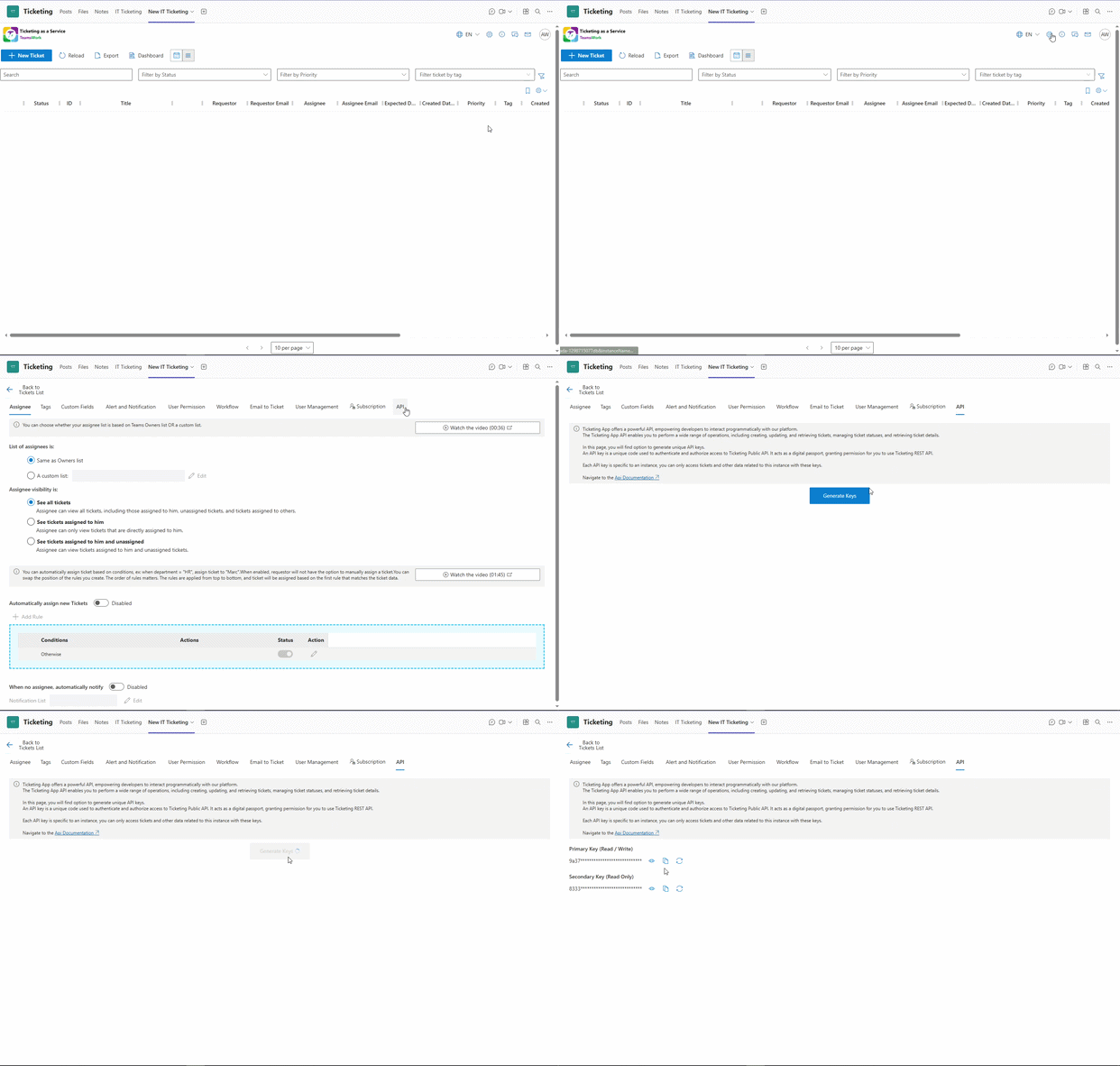
The API key in the settings area is valid only for a single ticketing instance.
Include the API key as a query parameter in every request:
[baseURL]/tickets?key={{your_API_Key}}&timezone=7Handle your API keys with care and keep them secure. Misuse or unauthorized access can compromise your Ticketing as a Service account. If you need help with API key authentication, contact our support team.
Sandbox environment
We recommend setting up your own sandbox or test environment. A dedicated test environment lets you safely test integrations, functionality, and API calls without affecting your live or production environment.
Errors
Ticketing API uses conventional HTTP response codes to indicate the success or failure of a request.
| Code range | Meaning |
|---|---|
2xx | Success. |
4xx | The request failed given the information provided (for example, a required parameter was omitted). Some 4xx errors can be handled programmatically and include an error code that briefly explains the error. |
5xx | An error with Ticketing's servers. |
Pagination
For some top-level API resources, Ticketing API provides pagination so you can retrieve large datasets in manageable pages, using the conventional limit and offset parameters. A list response is a single page in a reverse chronological stream of objects.
| Parameter | Description |
|---|---|
limit | The number of records to return in each page. |
offset | Sets the first position to return from the results. The default is 0, which starts the page at the first result. |
Auto-pagination with continuationToken
In addition to offset, you can use the continuationToken mechanism to fetch subsequent pages without managing offsets.
- Make an initial request with a
limitfor the number of records per page.ExampleGET [Base URL]/tickets?limit=50 - Check the response for a
continuationTokenfield. If it exists, more pages are available. - Make the next request and include the
continuationTokenas a header parameter. - Repeat steps 2 and 3 until the response has no
continuationToken; you have then retrieved all the data.
User
See IUser in the Schema. A user is represented by an ID, name, and email. For users from your Microsoft 365 organization, make sure this information stays consistent. Ticketing API does not verify the consistency between the user's ID, name, and email.
To get the ID, name, and email of a user, refer to the Object ID, Display Name, and Email attributes in Azure.
Custom fields
You can fetch custom field information and populate custom fields when creating new tickets, using the unique 36-character hash identifier of each custom field.
Your custom fields information can be found in the instance endpoint.
Got a Question or Need Help?
Reach out! Whether you're looking for support or have a cool suggestion for the app, we’re excited to hear from you!